
How to Build a Grid That Adapts to Its Window
A paged grid normally has a fixed page size, which either overflows a small window or wastes a large one. Recalculating the page size from the visible area, while still offering a fixed size and an unpaged view, means writing the same geometry and paging code for every screen.
TVisualGrid in Sphere 10 Pascal Framework builds that choice into the control. Its PageMode property selects whether a page holds every row, the rows that fit the viewport, or a fixed number of rows. This article shows how to bind a data source, how each mode decides its page size, and what happens when the mode or the window changes.

1. Bind one data source to three page modes
The grid reads its rows through the IDataSource interface. The simplest way to supply one is to derive from TCustomDataSource<T> and override three methods. GetColumns names the fields, FetchAll supplies the records, and GetItemField returns one field of one record as a Variant.
  TItem = record
    Id: Integer;
    Name: String;
    Value: Integer;
  end;
  TItemSource = class(TCustomDataSource<TItem>)
  protected
    function GetColumns: TDataColumns; override;
    procedure FetchAll(const AContainer: TList<TItem>); override;
    function GetItemField({$IFDEF FPC}constref{$ELSE}const{$ENDIF} AItem: TItem; const ABindingName: String): Variant; override;
  end;
Each grid column is bound to a field name through its Binding property. Assigning DataSource connects the grid to the provider, and RefreshGrid requests the current page.
    Grid.AddColumn('Id').Binding := 'Id';
    Grid.AddColumn('Name').Binding := 'Name';
    Grid.AddColumn('Value').Binding := 'Value';
    Grid.ManualPageSize := 25;
    Grid.PageMode := vpmManual;
    Grid.DataSource := Source;
    Grid.RefreshGrid;
After a fetch, RowCount reports the rows on the current page and Rows[I] returns a row whose fields are read by binding name, as in Grid.Rows[0].Id.
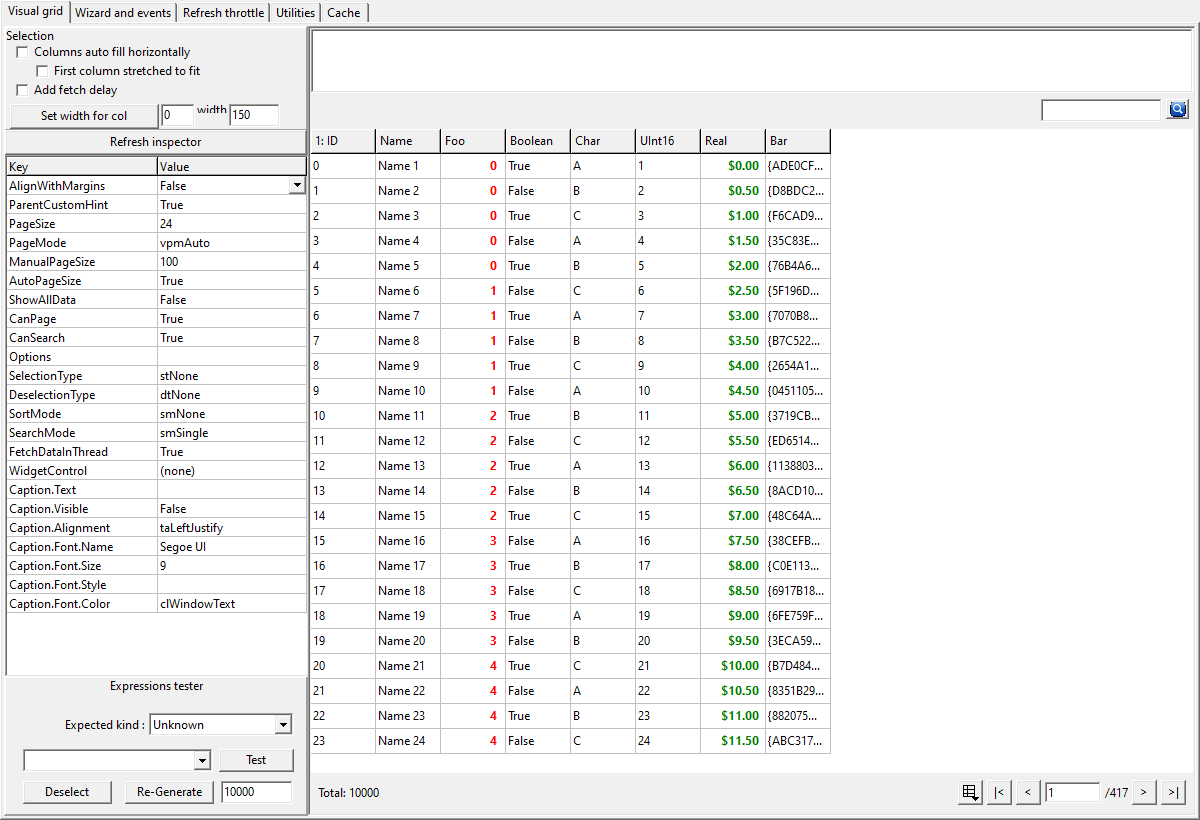
This retained screenshot is the repository's Delphi/VCL demonstration. The downloadable program is the separately executed LCL sample.
2. The three page modes
PageMode, which the binding code set to vpmManual, is a TVisualGridPageMode value. The mode only decides the page size that the grid requests. The data source and the column bindings are the same in every mode.
| Mode | Page size | Paging controls |
vpmManual (default) |
ManualPageSize, which defaults to 100 |
Shown |
vpmAuto |
The number of complete rows that fit the current viewport | Shown |
vpmSingle |
All matching rows in one page | Not needed |
3. Let Auto follow the window
In vpmAuto the grid measures its own viewport and sets PageSize to the number of complete rows that fit. When the control is resized, the grid recalculates that capacity and requests the page again. The application writes no resize handler.
    Grid.PageMode := vpmAuto;
    Window.Show;
    PumpLayout;
    Grid.RefreshGrid;
    PumpLayout;
    SmallCapacity := Grid.PageSize;
    Window.ClientHeight := 700;
    PumpLayout;
    Grid.RefreshGrid;
    PumpLayout;
    LargeCapacity := Grid.PageSize;
The capacity depends on native row height and on the grid having a parent with real bounds, so Auto only produces a meaningful size once the form is shown. A resize is applied after a short internal delay rather than on every size message. The sample's PumpLayout helper processes messages for a moment so that a console test can observe the settled value. A normal interactive form does not need it.
4. Switch modes at run time
PageMode can be changed at any time, and the grid's built-in paging menu changes the same property. A mode change does three things.
-
It returns to the first page.
-
It cancels a fetch that is still in flight, so an obsolete page cannot arrive after the switch.
-
It keeps
ManualPageSize, so returning tovpmManualrestores the size that was chosen earlier.
    Grid.PageMode := vpmManual;
    Grid.RefreshGrid;
    if (Grid.ManualPageSize <> 25) or (Grid.RowCount <> 25) then
      raise Exception.Create('Manual size was not retained');
The older Boolean properties AutoPageSize and ShowAllData remain available and map onto the same state. Setting either to True selects vpmAuto or vpmSingle, and clearing it returns to vpmManual. ManualPageSize ignores values of zero or less.
5. What the page mode does not change
-
TCustomDataSource<T>obtains its records throughFetchAlland then filters, sorts and slices them in memory. A very large or remote dataset needs anIDataSourcethat pages at the source. -
vpmSinglerequests every matching row, so it suits result sets that are small enough to load at once. -
Filtering and sorting apply to the whole result before a page is cut, in every mode. The
snapshot paging article
covers that query path and how to cache it.
-
The sample runs with
FetchDataInThread := Falseso that each fetch completes before the next statement. Background fetching is covered in the latest-refresh article .
The visual grid unit is the reference for every grid property.
6. Get the Framework and run the example
Get Sphere 10 Pascal Framework and follow its package instructions . Use the units directly, or build the optional Lazarus or Delphi runtime package.
The sample was compiled and run on Windows with Free Pascal 3.2.0 and the Lazarus Win32 widgetset, against
source revision
2cc6558
. Its Build.ps1 accepts the Framework, compiler, Lazarus and output paths. The program checks each mode and prints two lines.
Manual: 25 rows per page; Single: 100 rows
Auto page size grew after resize; Manual returned to 25
Download the complete runnable sample.
For the broader Sphere 10 development toolkit, see the Sphere10 Framework overview .
Author: Herman Schoenfeld
