
How to Build a Wizard That Changes Its Route at Runtime
A wizard with a fixed list of pages is simple to build. The work starts when a choice on one page decides which pages follow, when Back must return to a page with its input intact, and when a failed Finish has to leave the user in the wizard to try again.
TWizard<T> in Sphere 10 Pascal Framework handles that navigation. Each screen is a form that can validate itself and rewrite the remaining path, and the wizard keeps every screen instance alive for the whole run. This article covers how screens and the wizard are declared, how a screen changes the route with UpdatePath, and how FinishRequested makes completion retryable.

1. A first look
A screen chooses the pages that follow it from its OnNext hook by calling UpdatePath. The sample's first screen reads a flag on the wizard's model and continues either through a detail screen to a summary or straight to the summary.
procedure TChoiceScreen.OnNext;
begin
  inherited;
  if Model.UseDetail then
    UpdatePath(ptReplaceAllNext, [TDetailScreen, TSummaryScreen])
  else
    UpdatePath(ptReplaceAllNext, [TSummaryScreen]);
end;
ptReplaceAllNext replaces everything after the current screen with the listed screen classes, so the route is decided when the user presses Next. The rest of the article explains the parts this method relies on.
2. How the wizard is put together
A wizard has three parts. The model is a value of type T that every screen reads and writes, and it stays owned by the caller. The screens are forms derived from TWizardForm<T>, which the wizard creates and owns. The path is the ordered list of screen classes that the user will see, and it can change while the wizard runs.
Pressing Next always runs the same sequence on the current screen.
If Validate returns False, the sequence stops there and the screen stays active.
3. Declare the screens and the wizard
A screen overrides only the hooks it needs. A wizard class must implement FinishRequested and CancelRequested.
  TChoiceScreen = class(TWizardForm<TOptions>)
  public
    constructor Create(AOwner: TComponent); override;
    procedure OnNext; override;
  end;
  TDetailScreen = class(TWizardForm<TOptions>)
  public
    Draft: String;
    constructor Create(AOwner: TComponent); override;
    function Validate(out AMessage: String): Boolean; override;
    procedure OnNext; override;
  end;
TOptions is the sample's model class. It holds a flag that selects the route, the value collected by the detail screen and a flag that lets the sample reject the first Finish.
| Screen hook | When it runs |
Initialize |
Once, after the model has been assigned, including for screens added later. |
OnPresent |
Each time the screen is shown. |
Validate |
On Next, before anything else. Returning False keeps the screen active. |
OnNext |
After a successful Validate. This is where a screen commits its input to the model and may change the path. |
OnPrevious |
On Back. |
The wizard is created with its starting path and started with the model. Start initializes the screens and shows the host form modally.
    Wizard := TSampleWizard.Create(nil, [TChoiceScreen]);
    try
      Wizard.Start(Options);
TActionWizard<T> provides the same behaviour without a subclass by taking the finish and cancel handlers as method references.
4. Let a screen choose the remaining route
The starting path above contains a single screen. That screen declares the wstAssumeHasNext trait, which tells the wizard that a successor will be supplied from OnNext and that the button should read Next rather than Finish.
constructor TChoiceScreen.Create(AOwner: TComponent);
begin
  inherited CreateNew(AOwner);
  Traits := [wstAssumeHasNext];
end;
The successor comes from the TChoiceScreen.OnNext method shown in the first look. UpdatePath takes an update type and a list of screen classes.
| Update type | Effect on the path |
ptInject |
Inserts the screens directly after the current one. |
ptReplaceAllNext |
Replaces everything after the current screen. |
ptReplaceAll |
Replaces the whole path. |
ptRemoveNext |
Removes the listed screens from the part of the path that follows. |
Repeating an identical update is harmless, so OnNext can call it on every visit. Going Back restores the path as it was when the earlier screen was presented.
A screen that leaves the path is not destroyed. The wizard keeps one instance per screen class until the wizard itself is freed, so a screen that is removed by one choice and restored by another comes back with its controls and fields as the user left them.
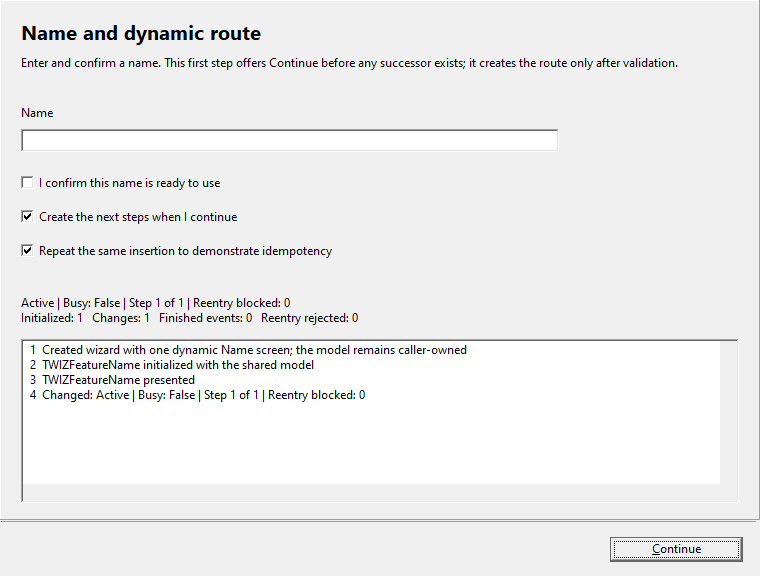
This retained screenshot belongs to the repository's Delphi/VCL wizard demonstration. It is separate from the downloadable sample, which drives its wizard from code.
5. Validate before leaving a screen
Validate returns False and a message to block Next. OnNext runs only after validation succeeds, which makes it a safe place to copy accepted input into the model.
function TDetailScreen.Validate(out AMessage: String): Boolean;
begin
  Result := Draft <> '';
  if Result then
    AMessage := ''
  else
    AMessage := 'Enter a value';
end;

procedure TDetailScreen.OnNext;
begin
  inherited;
  Model.Detail := Draft;
end;
6. Make Finish retryable
When Next is pressed on the last screen, or Finish is called, the wizard calls FinishRequested. This is where the application performs the operation the wizard was collecting input for. The sample stands in for that operation with a flag on the model.
function TSampleWizard.FinishRequested(out AMessage: String): Boolean;
begin
  Result := Model.CanFinish;
  if Result then
    AMessage := ''
  else
    AMessage := 'Not ready to finish';
end;
Returning True moves State to wsFinished, closes the host and fires FinishedEvent. Returning False with a message returns the wizard to wsActive on the same screen, so the user can correct the problem and press Finish again. An exception raised inside FinishRequested also releases the wizard for another attempt. CancelRequested works the same way for wsCancelled, and IsCancellable can forbid cancelling altogether.
The states are the values of TWizardState. The labels on the two transitional states refer to the result of FinishRequested and CancelRequested.
7. Drive the wizard from code
Each navigation command has a form that reports its outcome instead of showing a message.
| Method | Result |
TryNext, TryPrevious |
Return False and a message when navigation was rejected. |
Next, Previous |
Call the Try forms and pass a rejection message to ShowError. |
Finish, Cancel |
Return whether the wizard reached its terminal state. |
CurrentScreen, Screens and State expose the current position, and ChangedEvent fires when the path or state changes. The sample uses these to run without user input. It overrides the protected ShowHost method, which normally shows the modal host, and calls the navigation methods directly.
  Check(TryNext(Message), Message);
  Check(Length(Screens) = 3, 'Path should include the detail screen');
  Detail := TDetailScreen(CurrentScreen);
  Check(not TryNext(Message), 'Empty input should reject Next');
8. Limits
FinishRequested must not navigate.
-
UpdatePathis intended forOnNextandOnPrevious. Calling it while the wizard is finishing or after it has ended raises an exception. -
The wizard never frees the model. A class instance passed to
Startremains the caller's to release. -
FinishRequestedis an ordinary method call. The wizard does not make the operation behind it transactional or repeatable, so an operation that can partly succeed needs its own recovery. -
The sample drives real forms through an overridden
ShowHost. It verifies routes, retained screen state and the retry, and it is not a demonstration of the interactive host.
Path with detail=3 screens; without=2
Restored screen kept its input
Finish rejected once, then accepted
The wizard unit declares every type used here.
9. Get the Framework and run the example
Get Sphere 10 Pascal Framework and follow its package instructions . Use the units directly, or build the optional Lazarus or Delphi runtime package.
The sample was compiled and run on Windows with Free Pascal 3.2.0 and the Lazarus Win32 widgetset, against
source revision
2cc6558
. Its Build.ps1 accepts the Framework, compiler, Lazarus and output paths.
Download the complete runnable sample.
For the broader Sphere 10 development toolkit, see the Sphere10 Framework overview .
Author: Herman Schoenfeld
