
How to Build a Grid That Adapts to Its Window
A page size of twenty-five looks reasonable until the user maximises the window. Now half the screen is empty. Make the window smaller and the same page demands extra scrolling. A useful desktop grid should let the user choose a presentation policy without making the application invent three different data-binding implementations.
Sphere 10 Pascal Framework's TVisualGrid provides Single, Auto and Manual modes through the same control. In this example, a small provider supplies one hundred numbers. We display all matching records, switch to a finite page, try viewport-driven sizing, and return to the user's original manual choice. The modes change the presentation contract, while the column definition and provider remain the same.

Contents
Understand the Three Modes
Single presents the complete selected result in one page with native scrolling. Auto chooses the number of complete rows that fit the grid's current viewport. Manual uses a positive size chosen by the application or user. These are explicit policies rather than three names for the same fixed page size.
Set ManualPageSize independently of PageMode. A value of twenty-five survives a trip through Auto or Single, so returning to Manual restores a meaningful user choice. Mode changes start at page zero. Assigning the mode already selected does not needlessly reset the existing reading position. Auto can resize its page as the window changes without inventing a new underlying dataset.
Build a Small Data-Bound Grid
The provider below declares one named column, fills a typed integer list and supplies the field value requested by its binding. The form owns both components. Creating the provider before the grid also makes their destruction relationship easy to follow because the grid is destroyed before its provider owner releases the source.
The executable below creates real controls without opening a window. It uses a synchronous provider so the paging assertions are deterministic. Run the linked unified demo to resize a visible grid and explore Auto mode. Background retrieval is a separate capability, not a requirement for putting records on screen. The complete downloadable program includes its imports and provider implementation.
program ArticleSample;
{$IFDEF FPC}{$mode Delphi}{$H+}{$ENDIF}
uses
  {$IFDEF FPC}Interfaces, Forms, Controls,{$ELSE}Vcl.Forms, Vcl.Controls,{$ENDIF}
  Classes, SysUtils, Variants, Generics.Collections, UCommon.Data, UVisualGrid;
type
  TNumberSource = class(TCustomDataSource<Integer>)
  public
    FetchCount: Integer;
  protected
    function GetColumns: TDataColumns; override;
    procedure FetchAll(const AContainer: TList<Integer>); override;
    function GetItemField({$IFDEF FPC}constref{$ELSE}const{$ENDIF} AItem: Integer; const ABindingName: String): Variant; override;
  end;

function TNumberSource.GetColumns: TDataColumns;
begin
  Result := TDataColumns.Create(TDataColumn.From('Value', True));
end;

procedure TNumberSource.FetchAll(const AContainer: TList<Integer>);
var I: Integer;
begin
  Inc(FetchCount);
  for I := 1 to 100 do AContainer.Add(I);
end;

function TNumberSource.GetItemField({$IFDEF FPC}constref{$ELSE}const{$ENDIF} AItem: Integer; const ABindingName: String): Variant;
begin
  if ABindingName <> 'Value' then raise EDataTable.Create('Unknown binding');
  Result := AItem;
end;

var
  Window: TForm;
  Source: TNumberSource;
  Grid: TVisualGrid;
  Column: TVisualColumn;
begin
  Application.Initialize;
  Window := TForm.CreateNew(nil);
  try
    Window.ClientWidth := 640;
    Window.ClientHeight := 360;
    Source := TNumberSource.Create(Window);
    Source.SnapshotCacheEnabled := True;
    Grid := TVisualGrid.Create(Window);
    Grid.Parent := Window;
    Grid.Align := alClient;
    Grid.FetchDataInThread := False;
    Column := Grid.AddColumn('Number');
    Column.Binding := 'Value';
    Column.Filters := SORTABLE_NUMERIC_FILTER;
    Grid.ManualPageSize := 25;
    Grid.PageMode := vpmManual;
    Grid.DataSource := Source;
    Grid.RefreshGrid;
    if Grid.RowCount <> 25 then raise Exception.Create('Manual page did not contain 25 rows');
    Grid.PageMode := vpmSingle;
    Grid.RefreshGrid;
    if Grid.RowCount <> 100 then raise Exception.Create('Single mode lost records');
    Grid.PageMode := vpmAuto;
    Grid.PageMode := vpmManual;
    Grid.RefreshGrid;
    if Grid.ManualPageSize <> 25 then raise Exception.Create('Manual size was not retained');
    WriteLn('Single=100; Manual=25; remembered size=25');
  finally
    Window.Free;
  end;
end.
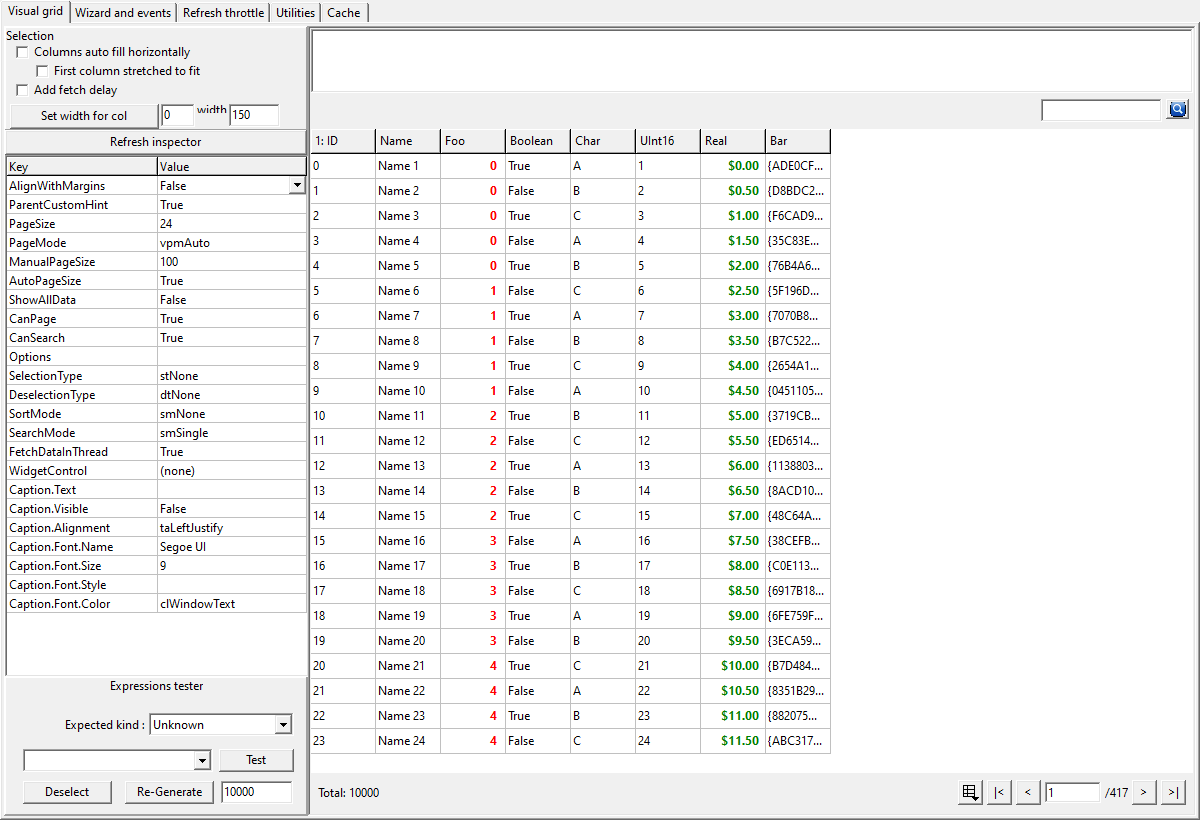
Original Delphi/VCL screenshot from the Framework repository, preserved without image editing.
Check the Result
Single=100; Manual=25; remembered size=25
Manual produces twenty-five rows. Single produces one hundred. After selecting Auto and returning to Manual, ManualPageSize is still twenty-five. The sample checks these values rather than treating a successful compilation as proof that the grid selected the right dataset.
Open the repository's unified demo to explore Auto visually by resizing the form, changing the footer mode and comparing the complete rows that fit. Its eight-column, ten-thousand-record grid is useful for trying large totals, horizontal scrolling and the compact footer. The screenshot here is that existing native Delphi/VCL demonstration, not a fabricated rendering of our smaller program.
Keep Paging Separate From Retrieval
Auto does not automatically turn every source into a database-side query. The default TCustomDataSource<T> implementation initially obtains its dataset through FetchAll. Snapshot caching can reuse that data for later page navigation. A provider that can perform indexed or server-side paging can override the paging method and return accurate counts and boundaries.
Filtering and sorting must apply to the selected query before taking its page. Sorting only the ten visible records gives a locally tidy display and a globally incorrect result. Keep the provider's query contract intact when replacing an in-memory example with a database or remote service.
PageSize setting zero, and it is not a promise that displaying an arbitrarily large result is cheap.
Apply It to a Real Screen
An administration screen can start in Auto to use available space, while a reconciliation workflow may prefer Manual because operators work through a fixed number of records. Single is useful for a small filtered list. Let the user change policy through the control's existing mode selector rather than adding unrelated checkboxes that compete with it.
Configure column bindings, search capabilities and selection independently. A named binding such as Value identifies the data field, while its visible caption can remain friendly. This separation makes the same provider reusable when a second screen needs different headings or renderers.
The Framework supplies the control, paging modes and data-source abstraction. Your application still owns the business query, record lifetime and decision about which mode makes sense. Start with the visual grid guide , then follow the snapshot and background-result tutorials when retrieval becomes the next bottleneck.
Get the Framework and Run the Example
Get
Sphere 10 Pascal Framework
and follow its
package instructions
. Use the units directly, or build the optional Lazarus .lpk or Delphi runtime package. Pascal uses these source/package workflows. The C# Framework is distributed separately through NuGet.
The attached application sample was compiled and executed with Free Pascal 3.2.0 on Windows against
this public source revision
, with range and overflow checks. Its Build.ps1 accepts the Framework, compiler, Lazarus and output paths so the example does not need machine-specific paths. Lazarus UI examples require the LCL Win32 widgetset. A successful FPC run does not claim a new Delphi build. Follow the repository's separate Delphi/VCL project and resource instructions there.
Download the complete runnable sample.
Continue the Series
How to Page and Sort Data Without Fetching the Same Snapshot Again
How to Keep Old Background Results Out of a New View
How to Share a Desktop Component Between Delphi and Lazarus
For the broader Sphere 10 development toolkit, see the Sphere10 Framework overview .