
How to Reuse a Pascal Grid in Delphi and Lazarus
Sharing desktop code means more than making one compiler accept another language mode. A component still depends on its UI library, resources, generic collection implementation and lifetime conventions. A useful shared example keeps those platform details at a visible boundary while leaving the application's behavior recognisable in both environments.
Sphere 10 Pascal Framework supplies the same grid, wizard, cache and utility APIs for Delphi/VCL and Lazarus/LCL. We will use a small data-bound grid as the concrete example. Its provider, column binding and paging decisions remain shared Pascal code, while compiler conditionals select the platform imports and parameter conventions.

Contents
Share the Behavior, Identify the Adapter
TCustomDataSource<Integer> describes one numeric field and supplies typed values. TVisualGrid binds that field and displays it using the native widget implementation selected by the Framework. The application does not duplicate its provider merely because the final control is a VCL grid in one build and an LCL grid in another.
The imports make the distinction explicit. Free Pascal uses Interfaces and LCL units, whereas Delphi uses the corresponding VCL units. Parameter declarations retain the Framework's compiler-specific const-reference convention. These are intentional compatibility boundaries, not evidence that the platform implementations are interchangeable binaries.
Build a Source-Based Example
The complete program creates a form, provider and grid, then checks Manual and Single presentation. It also changes mode and verifies that the independent manual size survives. The automated program constructs real controls without opening an interactive window. Use the linked unified demo when checking the visible Delphi/VCL or Lazarus/LCL presentation.
The same grid configuration is used in the adaptive-grid article. Here its purpose is different because the application behavior is small enough to inspect while discussing source paths, resources and separate build evidence. Start with this limited shared surface before introducing platform-specific drawing or shell integrations.
program ArticleSample;
{$IFDEF FPC}{$mode Delphi}{$H+}{$ENDIF}
uses
  {$IFDEF FPC}Interfaces, Forms, Controls,{$ELSE}Vcl.Forms, Vcl.Controls,{$ENDIF}
  Classes, SysUtils, Variants, Generics.Collections, UCommon.Data, UVisualGrid;
type
  TNumberSource = class(TCustomDataSource<Integer>)
  public
    FetchCount: Integer;
  protected
    function GetColumns: TDataColumns; override;
    procedure FetchAll(const AContainer: TList<Integer>); override;
    function GetItemField({$IFDEF FPC}constref{$ELSE}const{$ENDIF} AItem: Integer; const ABindingName: String): Variant; override;
  end;

function TNumberSource.GetColumns: TDataColumns;
begin
  Result := TDataColumns.Create(TDataColumn.From('Value', True));
end;

procedure TNumberSource.FetchAll(const AContainer: TList<Integer>);
var I: Integer;
begin
  Inc(FetchCount);
  for I := 1 to 100 do AContainer.Add(I);
end;

function TNumberSource.GetItemField({$IFDEF FPC}constref{$ELSE}const{$ENDIF} AItem: Integer; const ABindingName: String): Variant;
begin
  if ABindingName <> 'Value' then raise EDataTable.Create('Unknown binding');
  Result := AItem;
end;

var
  Window: TForm;
  Source: TNumberSource;
  Grid: TVisualGrid;
  Column: TVisualColumn;
begin
  Application.Initialize;
  Window := TForm.CreateNew(nil);
  try
    Window.ClientWidth := 640;
    Window.ClientHeight := 360;
    Source := TNumberSource.Create(Window);
    Source.SnapshotCacheEnabled := True;
    Grid := TVisualGrid.Create(Window);
    Grid.Parent := Window;
    Grid.Align := alClient;
    Grid.FetchDataInThread := False;
    Column := Grid.AddColumn('Number');
    Column.Binding := 'Value';
    Column.Filters := SORTABLE_NUMERIC_FILTER;
    Grid.ManualPageSize := 25;
    Grid.PageMode := vpmManual;
    Grid.DataSource := Source;
    Grid.RefreshGrid;
    if Grid.RowCount <> 25 then raise Exception.Create('Manual page did not contain 25 rows');
    Grid.PageMode := vpmSingle;
    Grid.RefreshGrid;
    if Grid.RowCount <> 100 then raise Exception.Create('Single mode lost records');
    Grid.PageMode := vpmAuto;
    Grid.PageMode := vpmManual;
    Grid.RefreshGrid;
    if Grid.ManualPageSize <> 25 then raise Exception.Create('Manual size was not retained');
    WriteLn('Single=100; Manual=25; remembered size=25');
  finally
    Window.Free;
  end;
end.
Verify What Each Build Establishes
Single=100; Manual=25; remembered size=25
This sample was compiled and executed with Free Pascal on Windows. The screenshot is the repository's existing Lazarus/LCL Auto-mode demonstration. The repository also supplies Delphi/VCL screenshots and separate native checks. Those are useful source material, but an FPC Delphi-language-mode build is not a new Embarcadero compiler result.
Build the supported Delphi project separately before claiming native VCL compatibility for your customised application. Its package and resource configuration are part of that compiler's verification path. Keep this evidence separate from an FPC build, even when both implementations expose the same Pascal declarations.
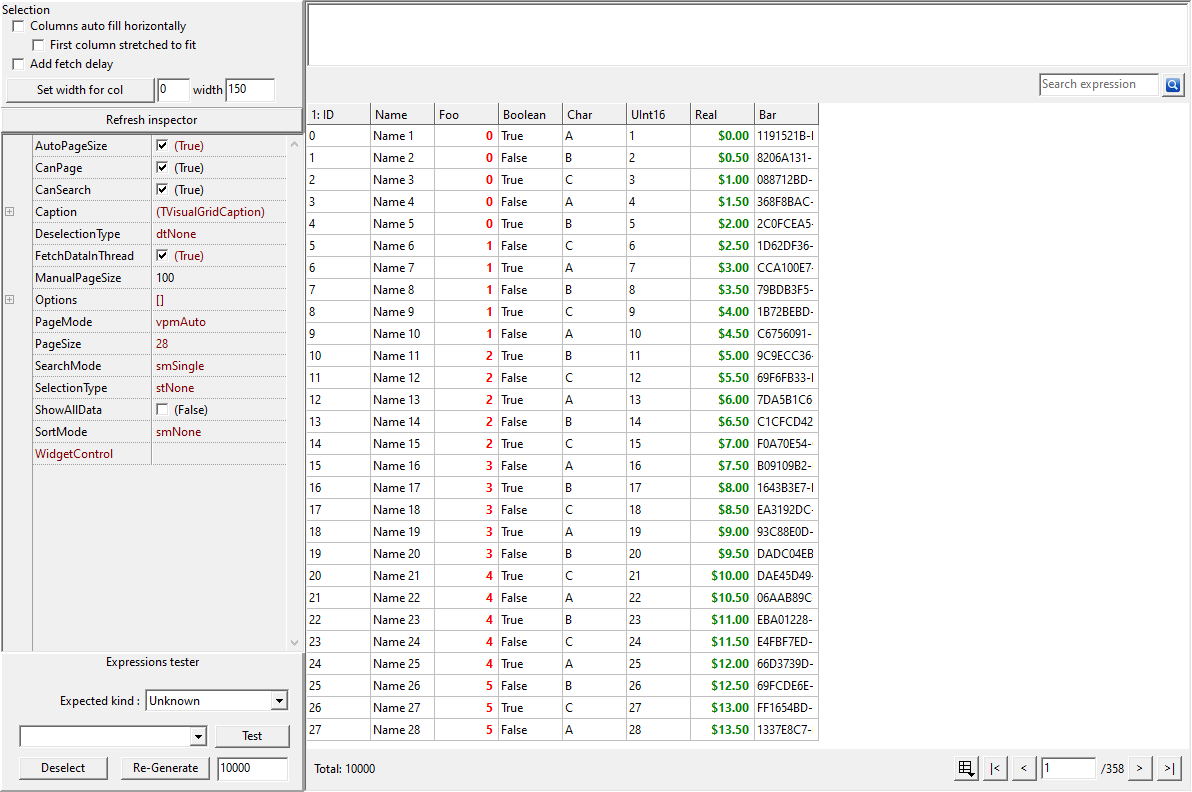
Original Lazarus/LCL screenshot from the Framework repository, preserved without image editing.
Keep Resources with the Component
For direct Delphi source consumption, add the documented UVisualGrid.VCL.rc resource entry so its search glyph is compiled and available. The runtime package already includes that resource relationship. Preserve the appropriate paired DFM/LFM form resources when reusing wizard or demo forms.
For Lazarus, include the proper LCL/FCL packages and compiled widgetset paths. The current supplied Windows projects use the Win32 widgetset for their Windows target architectures. Do not describe that as proof that every supplied desktop project has been tested on all operating systems.
Keep Product Policy Outside the Shared Control
The shared grid supplies paging, binding, selection and rendering hooks. Your application still chooses the dataset, validation, persistence and which operating-system features it needs. Place a native shell command or platform-specific integration behind the application's own boundary rather than mixing it into an otherwise reusable provider.
Build output should remain outside the library's source directories, with platform/configuration separation where appropriate. Pin the source revision used for an application and check the complete example rather than assuming an installed package matches a recently edited checkout.
The package instructions , unified demo and public API examples give a practical starting point. Sphere 10 Pascal Framework's advantage is a coherent shared application vocabulary, with real native adapters and explicit limits, rather than an unsupported promise that every desktop concern disappears behind one compiler switch.
Get the Framework and Run the Example
Get
Sphere 10 Pascal Framework
and follow its
package instructions
. Use the units directly, or build the optional Lazarus .lpk or Delphi runtime package. Pascal uses these source/package workflows. The C# Framework is distributed separately through NuGet.
The attached application sample was compiled and executed with Free Pascal 3.2.0 on Windows against
this public source revision
, with range and overflow checks. Its Build.ps1 accepts the Framework, compiler, Lazarus and output paths so the example does not need machine-specific paths. Lazarus UI examples require the LCL Win32 widgetset. A successful FPC run does not claim a new Delphi build. Follow the repository's separate Delphi/VCL project and resource instructions there.
Download the complete runnable sample.
Continue the Series
How to Build a Grid That Adapts to Its Window
How to Build a Wizard That Changes Its Route at Runtime
How to Give Pascal Resources Automatic Cleanup
For the broader Sphere 10 development toolkit, see the Sphere10 Framework overview .