
How to Build a Wizard That Changes Its Route at Runtime
A setup wizard is rarely a fixed slide show. A user who selects an advanced option may need another page, while a straightforward request can go directly to the summary. Going Back should preserve the earlier screen's state, and a failed final operation should allow a retry instead of forcing the user to start again.
Sphere 10 Pascal Framework models this as one wizard with typed screen forms, a shared model and a mutable route. The route contains screen classes, while the wizard owns their instances. Our example starts with one screen, selects a details branch, returns to the first step, chooses the shorter branch and retries a rejected finish.

Contents
Put Shared Values in a Model
TWizardForm<TRequest> gives each screen the same typed TRequest model. The model holds the branch choice and the number of finish attempts. A real application would put validated input there rather than reading controls from a form that is no longer visible.
The wizard owns its screen instances, including screens removed from the current route. The caller owns this class-based model. Keep it alive until the wizard is finished and destroyed. Removing a class from the route is not a signal to free the corresponding form yourself.
Construct the Continuation After Validation
The first screen advertises wstAssumeHasNext, because its accepted OnNext will supply a continuation. It uses ptReplaceAllNext to choose Details then Summary, or Summary alone. Route selection happens in the screen's navigation lifecycle, not in a second independent button handler that bypasses validation.
The executable example overrides the modal presentation hook to exercise navigation deterministically without asking a reader to click a dialog during verification. The normal wizard uses its native host. This hook automates the sample's navigation while retaining the Framework's screen, validation and ownership implementation.
program ArticleSample;
{$IFDEF FPC}{$mode Delphi}{$H+}{$ENDIF}
uses
  {$IFDEF FPC}Interfaces, Forms,{$ELSE}Vcl.Forms,{$ENDIF}
  Classes, SysUtils, UWizard;
type
  TRequest = class
  public
    NeedsDetails: Boolean;
    Attempts: Integer;
  end;
  TStartScreen = class(TWizardForm<TRequest>)
  public
    constructor Create(AOwner: TComponent); override;
    procedure OnNext; override;
  end;
  TDetailsScreen = class(TWizardForm<TRequest>)
  public
    constructor Create(AOwner: TComponent); override;
  end;
  TSummaryScreen = class(TDetailsScreen);
  TRequestWizard = class(TWizard<TRequest>)
  protected
    function FinishRequested(out AMessage: String): Boolean; override;
    function CancelRequested(out AMessage: String): Boolean; override;
    procedure ShowHost; override;
  end;

constructor TStartScreen.Create(AOwner: TComponent);
begin
  inherited CreateNew(AOwner);
  Traits := [wstAssumeHasNext];
end;

constructor TDetailsScreen.Create(AOwner: TComponent);
begin
  inherited CreateNew(AOwner);
end;

procedure TStartScreen.OnNext;
begin
  inherited;
  if Model.NeedsDetails then
    UpdatePath(ptReplaceAllNext, [TDetailsScreen, TSummaryScreen])
  else
    UpdatePath(ptReplaceAllNext, [TSummaryScreen]);
end;

function TRequestWizard.FinishRequested(out AMessage: String): Boolean;
begin
  Inc(Model.Attempts);
  Result := Model.Attempts > 1;
  if Result then AMessage := '' else AMessage := 'Please review and retry';
end;

function TRequestWizard.CancelRequested(out AMessage: String): Boolean;
begin
  AMessage := '';
  Result := True;
end;

procedure TRequestWizard.ShowHost;
var AMessage: String;
begin
  if not TryNext(AMessage) then raise Exception.Create(AMessage);
  if Length(Screens) <> 3 then raise Exception.Create('Details branch missing');
  if not TryPrevious(AMessage) then raise Exception.Create(AMessage);
  Model.NeedsDetails := False;
  if not TryNext(AMessage) then raise Exception.Create(AMessage);
  if Length(Screens) <> 2 then raise Exception.Create('Summary branch missing');
  if Finish(AMessage) then raise Exception.Create('First finish should be rejected');
  if State <> wsActive then raise Exception.Create('Rejected finish did not stay active');
  if not Finish(AMessage) then raise Exception.Create(AMessage);
  WriteLn('Details branch=3; summary branch=2; finish attempts=2');
end;

var Request: TRequest; Wizard: TRequestWizard;
begin
  Application.Initialize;
  Request := TRequest.Create;
  try
    Request.NeedsDetails := True;
    Wizard := TRequestWizard.Create(nil, [TStartScreen]);
    try
      Wizard.Start(Request);
      if Wizard.State <> wsFinished then raise Exception.Create('Finish failed');
    finally
      Wizard.Free;
    end;
  finally
    Request.Free;
  end;
end.
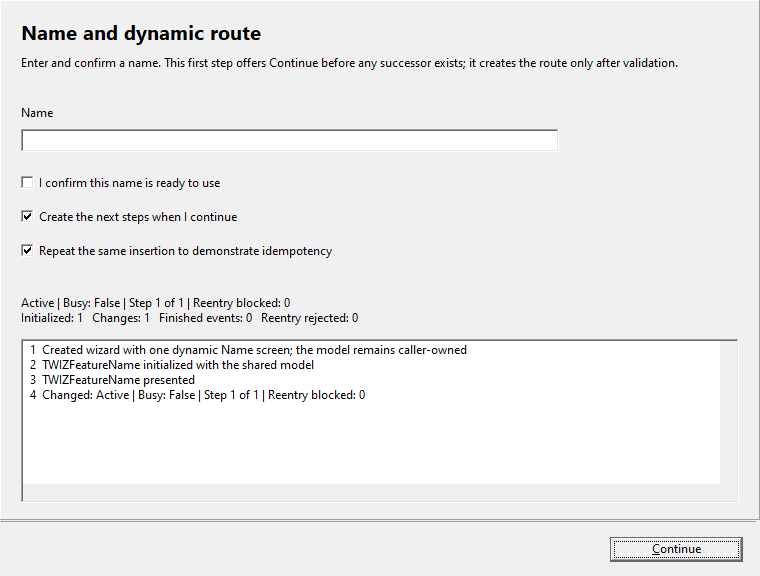
Original Delphi/VCL screenshot from the Framework repository, preserved without image editing.
Follow the Observed Route
Details branch=3; summary branch=2; finish attempts=2
The first accepted Next creates a three-screen path. After Previous, the same start-screen instance selects a two-screen path. A rejected Finish leaves the state active, so the second attempt can succeed. The sample checks the route lengths and terminal state rather than assuming that calling a finish method always closes the flow.
The repository's native wizard screenshot shows the related interactive showcase. Its launcher lets you test validation, optional notes, route injection/replacement, a confirmation boundary and simulated failures. The image is an existing Delphi/VCL demonstration, while this article's automated program was checked separately with Free Pascal.
Keep Completion Retryable and Deliberate
FinishRequested returns a Boolean and a message. Returning false is an ordinary rejected completion, not a completed transaction. The sample rejects the first call deliberately so the retry can be seen. In a real application, the callback should perform its approved business operation and report its actual outcome.
Do not equate wizard validation with a database transaction. If the final action can partially affect an external system, its own idempotency and recovery design still matters. The wizard supplies lifecycle admission and retryable presentation, while atomicity remains a property of the external operation.
Design the Route as Part of the Product
A route should explain a useful workflow. Use an optional details page because a choice requires more information, not because dynamic navigation is available. Preserve useful Back behavior and make irreversible confirmation boundaries explicit. The user should be able to understand why a step appeared or disappeared.
Use ptInject for an added continuation, replacement modes for a revised path and removal only for the documented future-route case. Keep screen initialization separate from each presentation because a retained screen may be presented more than once without becoming a newly created object.
The wizard implementation documents those operations, and the interactive showcase demonstrates them together. This is a reusable workflow host rather than a stack of unrelated modal forms, leaving your application free to focus on the decisions and data that make the wizard useful.
Get the Framework and Run the Example
Get
Sphere 10 Pascal Framework
and follow its
package instructions
. Use the units directly, or build the optional Lazarus .lpk or Delphi runtime package. Pascal uses these source/package workflows. The C# Framework is distributed separately through NuGet.
The attached application sample was compiled and executed with Free Pascal 3.2.0 on Windows against
this public source revision
, with range and overflow checks. Its Build.ps1 accepts the Framework, compiler, Lazarus and output paths so the example does not need machine-specific paths. Lazarus UI examples require the LCL Win32 widgetset. A successful FPC run does not claim a new Delphi build. Follow the repository's separate Delphi/VCL project and resource instructions there.
Download the complete runnable sample.
Continue the Series
How to Give Pascal Resources Automatic Cleanup
How to Share a Desktop Component Between Delphi and Lazarus
For the broader Sphere 10 development toolkit, see the Sphere10 Framework overview .