
How to Write a Custom Binary Serializer in C#
Automatic serializers are convenient until the byte layout matters. A wire protocol, a file format or a fixed-size index key needs every field at a known position and width, and a layout inferred from a class can change when the class does. Sphere10 Framework lets you state the layout yourself, one member at a time, and still reuse its built-in serializers for the parts you do not care to write.
This article shows the two ways to take control. SerializerBuilder composes a serializer for a class by naming the serializer of each member, and a class derived from ConstantSizeItemSerializerBase<TItem> writes a value by hand with a size that never varies. It also shows how to register a custom serializer so that the Framework's automatic assembly uses it.
1. A first look
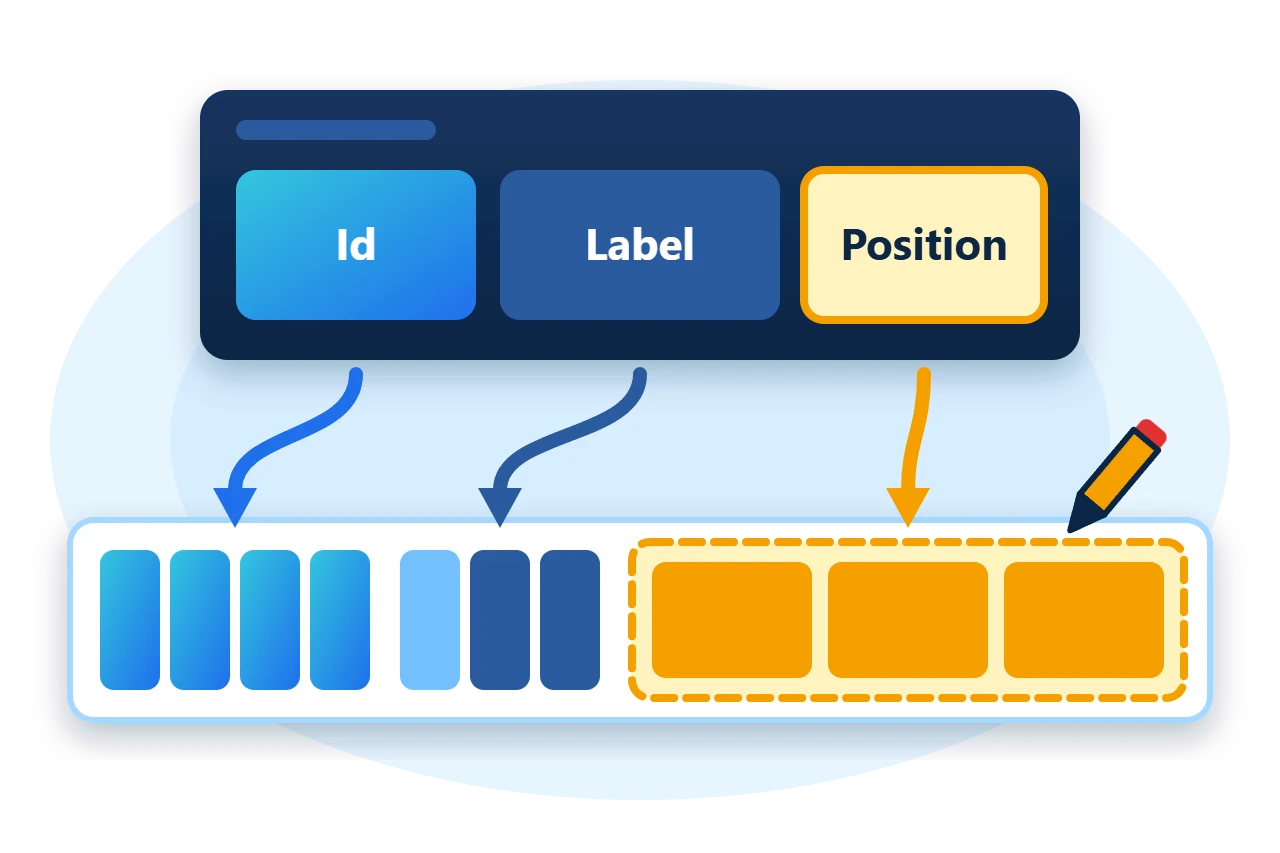
A class is described member by member. SerializerBuilder.For<TItem>() starts a builder that creates instances with the parameterless constructor, each Serialize call binds one member to a serializer, and Build() returns the composite.
var serializer = SerializerBuilder
	.For<Reading>()
	.Serialize(x => x.Id, PrimitiveSerializer<long>.Instance)
	.Serialize(x => x.Label, StringSerializer.UTF8.AsReferenceSerializer())
	.Serialize(x => x.Position, pointSerializer)
	.Build();
Members are written in the order of the calls, so the calls are the layout. The first two bindings use built-in serializers, and pointSerializer is a hand-written serializer for a small value type, which a later section writes.
2. How a serializer is defined
Every serializer implements IItemSerializer<TItem>. It writes an item to an EndianBinaryWriter, reads one back from an EndianBinaryReader, and reports sizes through the IItemSizer<TItem> half of the contract. Each call receives a SerializationContext, which tracks the objects already written so that references can be shared.
Two base classes cover hand-written serializers, and a third type is the one the builder produces.
Derive from ConstantSizeItemSerializerBase<TItem> when every item takes the same number of bytes, and from ItemSerializerBase<TItem> when the size depends on the item. CompositeSerializer<TItem> writes an object as the ordered serializations of its members, and SerializerBuilder is how you configure one.
3. Write a constant-size serializer
The sample serializes a small value type of three double components.
public readonly record struct Point3(double X, double Y, double Z);
Its serializer passes the fixed size to the base constructor and implements the two directions. The second constructor argument states whether the serializer accepts null, which a value type never needs.
public sealed class Point3Serializer : ConstantSizeItemSerializerBase<Point3> {
	public Point3Serializer()
		: base(3 * sizeof(double), false) {
	}

	public override void Serialize(Point3 item, EndianBinaryWriter writer, SerializationContext context) {
		writer.Write(item.X);
		writer.Write(item.Y);
		writer.Write(item.Z);
	}

	public override Point3 Deserialize(EndianBinaryReader reader, SerializationContext context)
		=> new(reader.ReadDouble(), reader.ReadDouble(), reader.ReadDouble());
}
The base class supplies the sizing members. IsConstantSize is true and ConstantSize is 24, which lets collections and indexes that require fixed-width items accept the type. The writer and reader apply the byte order chosen by the caller, so the serializer itself contains no endianness logic.
4. Compose a class with SerializerBuilder
The builder call in the first look binds three members, and the three bindings use three kinds of serializer.
-
PrimitiveSerializer<long>.Instanceis the built-in fixed-width serializer for a primitive. -
StringSerializer.UTF8writes a length-prefixed string.AsReferenceSerializer()wraps it so that the member may benull, at the cost of one prefix byte. -
pointSerializeris the hand-writtenPoint3Serializer.
For an item with Id 42, Label "probe" and a position, the composite writes 39 bytes.
The prefix byte is 0 for null and 1 for a value that follows. A null label therefore reduces the item to 33 bytes, because nothing follows the prefix.
Use For(() => new Reading(...)) when the type has no parameterless constructor. A member that is never bound is not serialized, which is how you leave one out.
5. Serialize, deserialize and size
The extension methods on IItemSerializer<TItem> create and dispose a SerializationContext for a single call.
var bytes = serializer.SerializeBytesLE(reading);
var copy = serializer.DeserializeBytesLE(bytes);
Require(serializer.CalculateSize(reading) == bytes.Length, "CalculateSize should equal the bytes written.");
SerializeBytesLE and DeserializeBytesLE use little-endian byte order, and SerializeToBytes and DeserializeBytes take an Endianness argument. CalculateSize returns the size without writing anything, which storage code uses to allocate space before serializing.
6. Register the serializer in a factory
SerializerFactory maps CLR types to serializers. SerializerFactory.Default holds the built-in registrations and is read-only, so application registrations go into a copy.
var factory = new SerializerFactory(SerializerFactory.Default);
factory.Register<Point3, Point3Serializer>();
factory.RegisterAutoBuild<Reading>();
var assembled = factory.GetSerializer<Reading>();
Register<TItem, TSerializer>() records the custom serializer for Point3. RegisterAutoBuild<Reading>() then assembles a composite for Reading from its public read-write members and resolves each member through the factory, so Position uses Point3Serializer without being named. This is the route to take when only one or two types need a hand-written layout and the rest can be assembled automatically.
7. Limits to plan for
-
The layout is the contract. Reordering
Serializecalls, or adding or removing one, changes the bytes. Data written with the old serializer needs the old serializer to read it. -
No versioning is built in. A format that must evolve needs its own version field, or a
VersionedSerializersmap from version numbers to factories. -
Automatic assembly has requirements.
RegisterAutoBuildneeds a public parameterless constructor and covers public read-write properties and fields. Mark a member[Transient]to exclude it. -
Constant size is a promise. A
ConstantSizeItemSerializerBase<TItem>must write exactly the size it declared for every item.
8. Get the package and run the sample
The serializers ship in the Sphere10.Framework NuGet package. The sample targets .NET 10.
dotnet new console --framework net10.0 --name ArticleSample
cd ArticleSample
dotnet add package Sphere10.Framework
The complete MIT-licensed sample contains every file shown above. Extract the download and run it.
dotnet run -c ReleaseThe program round-trips an item through the builder's serializer, checks the reported sizes and repeats the round trip through the factory.
Builder serializer: 39 bytes, round trip passed
Null label: 33 bytes
Factory-assembled serializer used Point3Serializer: passed
The Serialization guide lists every built-in serializer, and the SerializerBuilder source shows the remaining builder options.
The Sphere10 Framework overview describes the rest of the toolkit.
Author: Herman Schoenfeld
