When your product depends on the camera, location, notifications or records held on the device, it has to be built for the phone it runs on. Sphere 10 develops native mobile applications for customer products, field teams and business tools, together with the .NET services behind them.
What we build
Choose the right native route. We build with Swift and SwiftUI for Apple devices, Kotlin and Jetpack Compose for Android, or .NET MAUI where shared C# suits the product.
Prove the device feature early. Bring the target phones, tablets or specialist hardware and the task they must perform. We get the difficult integration working before building out the remaining screens.
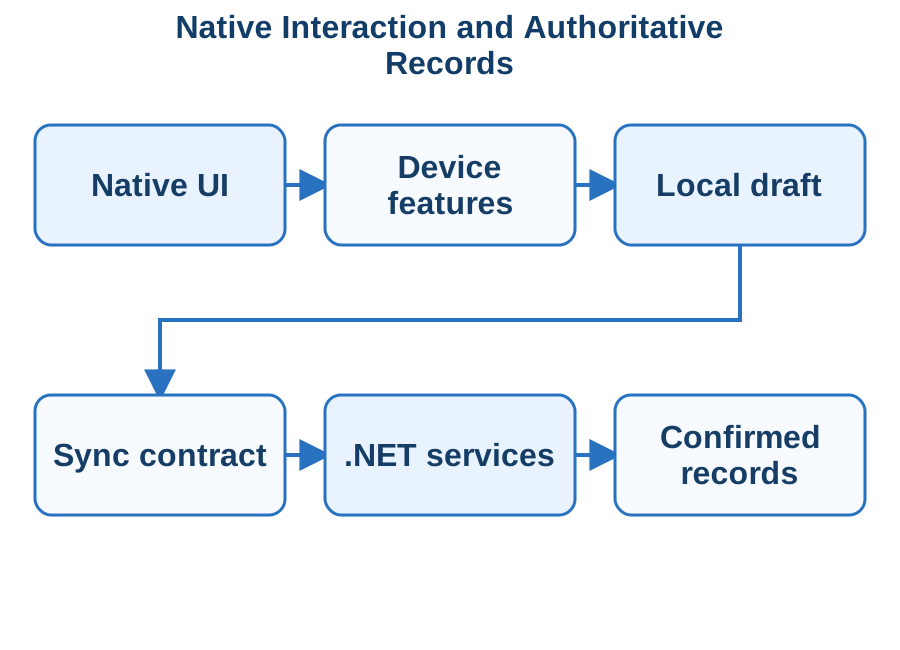
Connect it to your business systems. Secure sign-in and .NET services hold the authoritative records and rules. The app always distinguishes a draft on the device from a result the server has confirmed.
Plan for interruptions. Work is saved before the app is suspended, resumes afterwards and synchronises without creating duplicate records. A denied permission leads to a usable alternative.
Illustration of device work separated from backend confirmation and persistent business state.
What you receive
Source code for the mobile app and its supporting services, with documented service interfaces.
A real-device acceptance matrix covering the agreed operating systems, screens, text sizes and peripherals.
Release configuration, with signing and distribution responsibilities written down.
Test results for a slow network, an expired session, an unavailable device feature and an update over existing data.
How we engage
Project Design, paid on time and materials, settles the platforms, the supported devices and the hardest device integration. The build then proceeds at a fixed price and is accepted on physical devices against the agreed matrix.
Technologies & Integration
SwiftUI — Implement Apple-platform screens, state and accessibility, integrating UIKit or native device APIs where the workflow requires them.
Jetpack Compose — Build Kotlin Android interfaces with explicit lifecycle, navigation, permissions and device integration.
.NET MAUI — Use shared C# application code and native-control handlers with deliberate platform-specific bindings and testing.
Blazor Hybrid — Provide the separate Razor/WebView approach when that UI model fits the installed application and device-service boundary.
OpenID Connect and OAuth security — Define public-client sign-in, PKCE, redirect handling and the token/access boundary to the ASP.NET Core service.
Virtual reality earns its place when a person can practise a task or examine a product in a way a screen cannot offer. Sphere 10 builds VR applications for training, product visualisation and guided interactive experiences, including the session setup, participant records and operator controls that make the experience useful to your organisation.
What we build
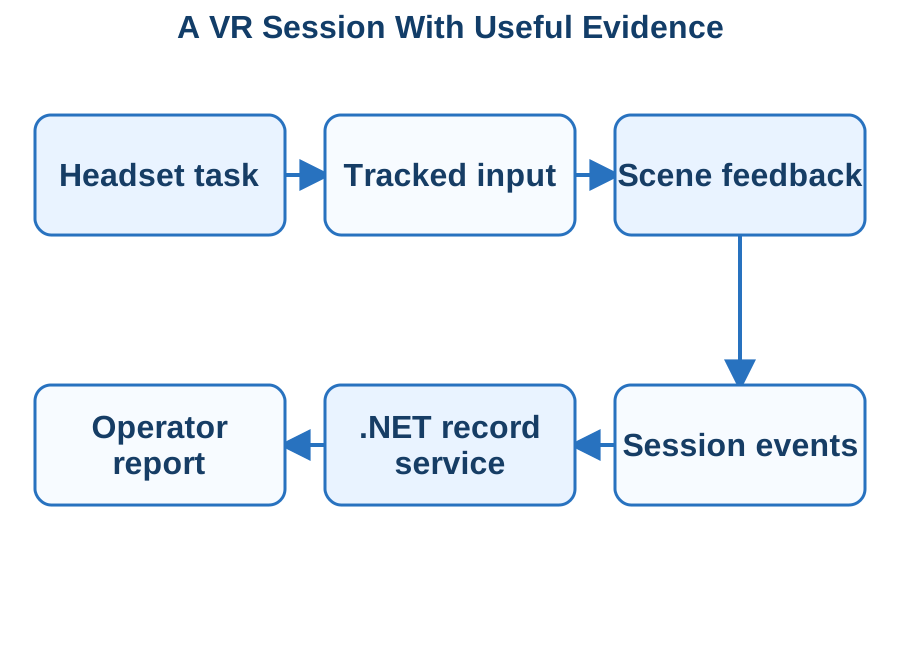
Begin with a headset task. One representative training action or product interaction comes first. We prove tracking, input, comfort and feedback on the actual device before a large scene library is produced.
Design for the people in the room. We define the play area, seated or standing use, supervision and a clear way to pause or exit, with alternatives for interactions a participant cannot complete.
Record what matters. Each session reports who took part, which scenario version they used and the meaningful actions they completed. Records survive a dropped connection.
Keep content maintainable. Models, audio, scenario versions and their licences are tracked, so you can tell which content a recorded session used.
Illustration of immersive interaction generating controlled session records.
What you receive
The Unity or Unreal project, plus source for the supporting reporting and administration services.
Build, installation and session-start instructions for the selected Meta Quest or PC headset environment.
The measured limits of the target device, including performance, loading and session length.
A workflow your maintainers can follow to update scenarios.
How we engage
Acceptance takes place on the agreed headset, in the physical setting where it will be used, with realistic content and session length. We test tracking loss, controller disconnection and restart before you sign off.
Technologies & Integration
Unity XR Interaction Toolkit — Implement tracked input, interactors and task-specific object interaction with a measured target-device scene.
OpenXR — Select supported runtime features and controller profiles, verifying the engine/device extension requirements explicitly.
Unreal Engine XR — Configure the selected Unreal XR project, supported devices and interaction/content deployment path.
Unity Profiler — Measure CPU, GPU, memory and loading behaviour during the actual headset interactions and scene transitions.
A game has to be enjoyable to play before it is worth filling with content, and it has to keep working after release. Sphere 10 develops games and interactive software from a first playable loop through to repeatable release builds and the online services behind them.
What we build
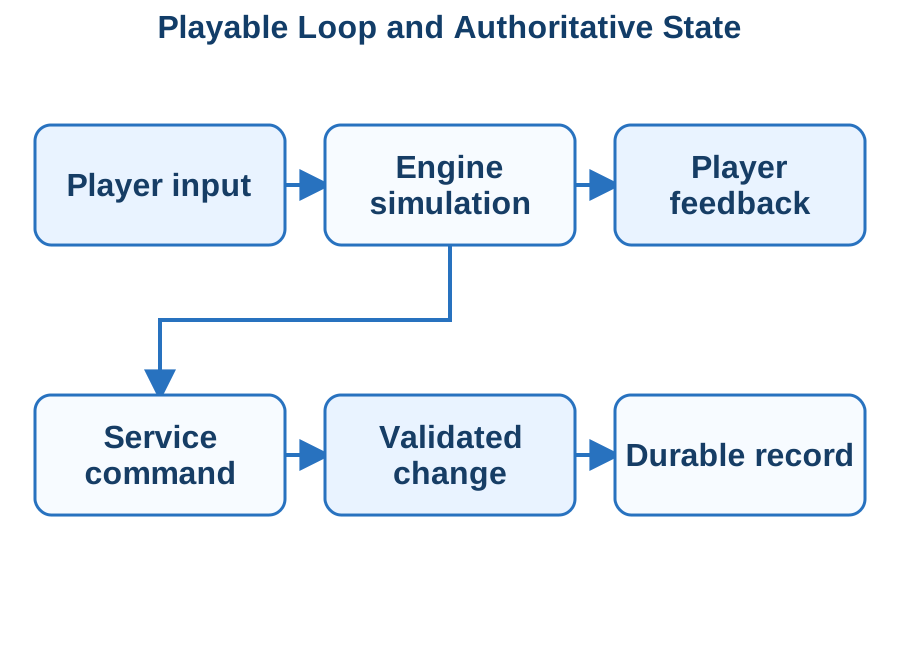
Prove the playable loop. We begin with the smallest complete interaction that shows the intended experience. It establishes control, feedback and pacing while the design is still inexpensive to change.
Pick the engine for the game. Unity, Unreal Engine or Godot is selected around your mechanics, target hardware and content.
Measure on real hardware. Frame rate, loading time and memory are checked on the minimum hardware you intend to support, from the first slice onwards.
Keep accounts and progress on the server. Player accounts, purchases, progression and inventory are held by .NET services. Repeated messages and disconnects do not create inconsistent progress.
Protect saved games. Old saves are tested against each new build, so a release does not make existing progress unreadable.
Illustration of the game client separated from durable service records.
What you receive
The engine project, an inventory of assets and dependencies, build configuration and any service or administration code.
Measured performance results for the packaged build on the agreed minimum hardware.
A release checklist that separates game content, client code and server changes.
The diagnostic files needed to explain a crash.
How we engage
The playable slice is the first deliverable and sets the constraints for the wider build. Acceptance covers a complete player journey on the agreed hardware, including a clean installation, controller input, save and load, and the relevant network failures.
Technologies & Integration
Unity Profiler — Measure simulation, rendering, allocation and asset-loading costs against the agreed playable scenario and hardware budget.
Unreal Engine networking — Design the selected replication and server-authority model with explicit latency, session and disconnect behaviour.
Godot C#/.NET — Implement the selected Godot project with C# scripting, controlled runtime dependencies and verified export requirements.
ASP.NET Core services — Deliver authenticated account, progression and inventory APIs with identified commands and durable business outcomes.
Many business applications are requests, approvals, registers and forms that outgrow a spreadsheet. Sphere 10 builds them on Power Apps, Dataverse, Power Automate and Notion, so your team gets a working system sooner and can operate and change it with confidence.
What we build
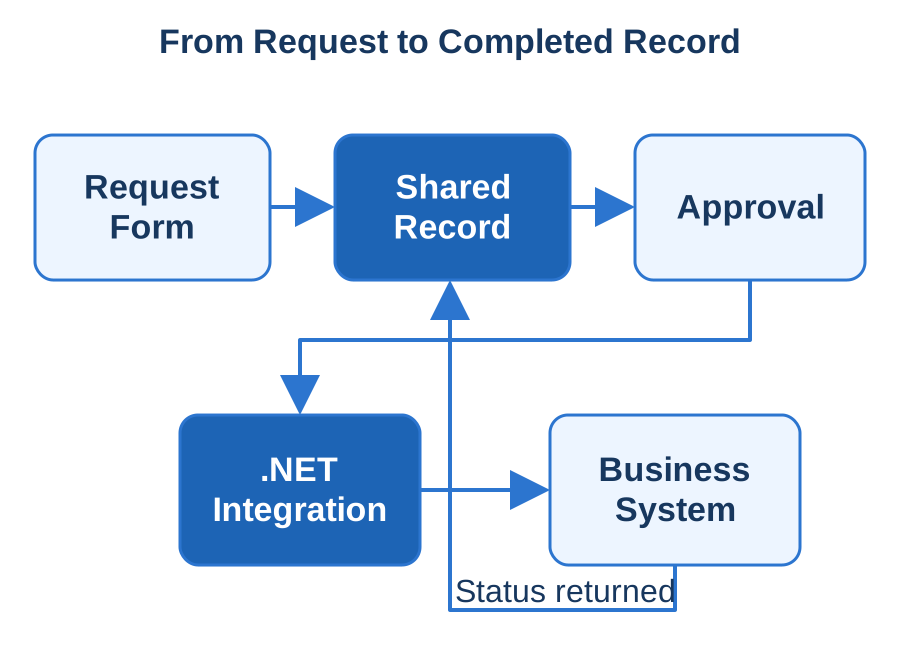
Start with one real record. Bring an actual request, spreadsheet or inspection form. We trace who creates it, who approves it and which system must receive the result, then settle the rules before configuring screens.
Build the whole workflow. Internal request systems, field forms, customer onboarding, stock registers and operational dashboards are delivered with their permissions, approvals and administration designed together.
Connect your existing systems. Forms and flows link to your accounting, CRM, inventory or document systems. Where a calculation or update is too complex for configuration, a focused .NET service handles it.
Make failures visible. Rejected approvals, reassigned staff, duplicate triggers and expired connections are tested. A retry does not create a second invoice, and failed updates appear in a work queue with enough context to resolve them.
A configured request and approval workflow connects to business records through an explicit integration boundary.
What you receive
The configured solution, a data dictionary, integration mappings and operating instructions.
Separate development and production environments, with a documented deployment procedure.
Administrator walkthroughs showing which changes belong in a form or flow and which need an extension.
A retained set of acceptance cases for future changes.
How we engage
Acceptance follows a real record through submit, review, correct and approve to the record it creates downstream. The application is handed over so that it does not depend on any one person's account. Our own Local Notion product uses the same division, with Notion for authoring and .NET for publication.
Technologies & Integration
Power Apps — Canvas/Power Fx task screens and model-driven forms designed against the actual data, permission and device requirements.
Dataverse — Tables, relationships, roles, custom APIs and .NET plug-in boundaries for business operations that need server-side rules.
Power Automate — Approval and integration flows with explicit connector ownership, retry behaviour and traceable downstream outcomes.
Notion API — Structured content and record integration, including the authoring-to-publication separation demonstrated by Local Notion.
Shared UI, Native Access|Shared Web Interfaces|Native Device Bridges
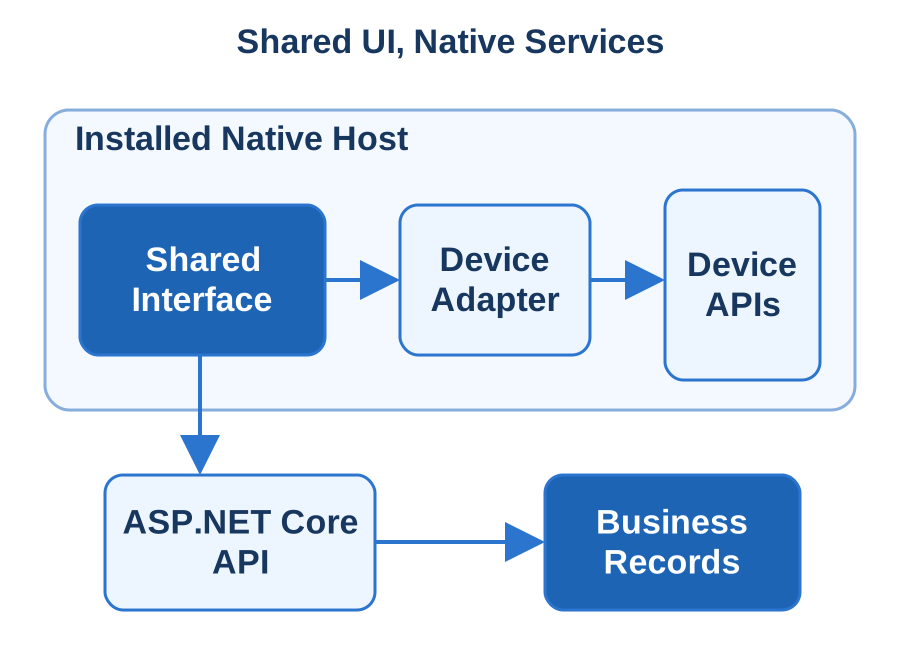
If you want one interface across phones, tablets and desktops but still need the camera, files, notifications or a scanner, a hybrid application can give you both. Sphere 10 builds a shared web interface inside an installed app, with the native host, local data and supporting services delivered as one product.
What we build
Choose the host around the task. A warehouse tablet with a scanner, a customer mobile app and a desktop administration tool have different needs. We weigh your existing React, Angular, Vue or C# investment and select Capacitor with Ionic, or Blazor Hybrid.
Prove the device feature early. A working camera, scanner, file exchange or sign-in on the target device settles the choice more effectively than a browser mock-up.
Keep device access controlled. The interface reaches the camera, secure storage, notifications and files through a small set of defined services. Business rules stay consistent on the server.
Design offline work and resumption. Drafts, pending uploads and confirmed results are kept separate, so users see the state of their work and a resumed request is not submitted twice.
A packaged interface calls explicit native services and a separate business API.
What you receive
The shared interface project, native host projects, device adapters and backend changes, with repeatable build instructions.
A release procedure with named owners for signing identities, store accounts and environment settings.
Rollback, compatibility and troubleshooting steps for each supported platform.
How we engage
Project Design establishes the device range, distribution channel and which screens are worth sharing. Fixed-price delivery is accepted on representative physical hardware through install, sign-in, device work, reconnection and an update over existing data.
Technologies & Integration
Capacitor — Native iOS/Android hosts and documented plug-in boundaries for TypeScript applications.
Ionic — Mobile-oriented web components integrated with the selected React, Angular or Vue application and Capacitor host.
Blazor Hybrid — Razor components executing in native .NET and rendering through an embedded WebView, with platform services exposed through explicit interfaces.
ASP.NET Core — Authenticated APIs, server-side validation and integration contracts shared by the installed clients.
TypeScript — Typed web UI, plug-in adapters and API client models for the JavaScript-based hybrid stack.
Native Apple Experiences|Native Apple Interfaces|Reliable Mobile Workflows
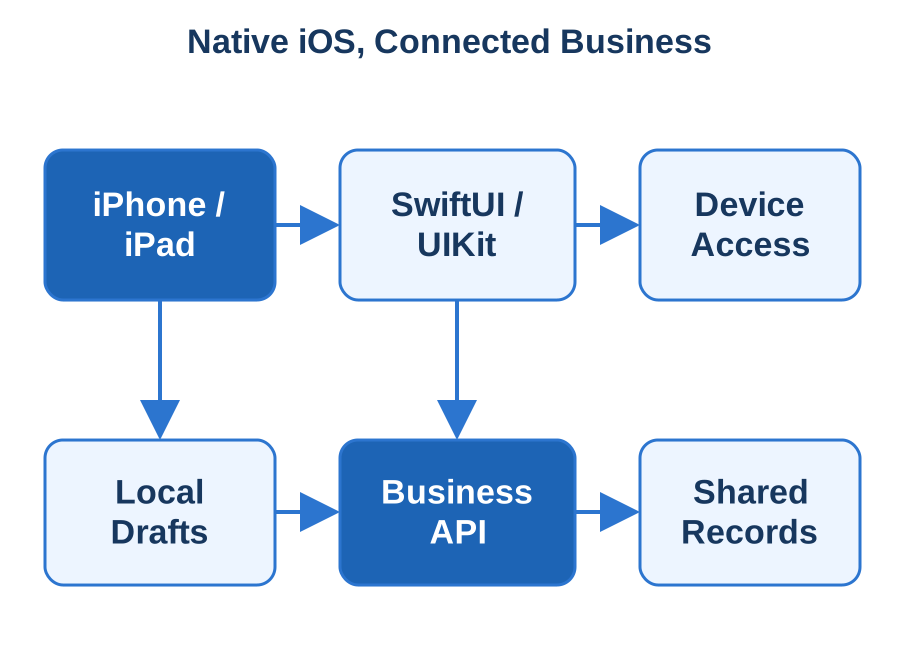
Your customers and field staff expect an iPhone or iPad app to feel at home on the device and to tell them plainly whether their work went through. Sphere 10 designs and builds native iOS applications and connects them to the business systems behind them.
What we build
Design the complete device task. We choose a real activity, such as appointment check-in, account management or capturing an inspection and its photos, and define what the user can finish offline and what needs server confirmation.
Build an interface that belongs on iOS. Screens follow the job across the selected iPhone and iPad sizes, using Apple's SwiftUI and UIKit. Accessibility, larger text and permission requests are tested with the feature itself.
Make completion visible. A queued upload, a submitted request and a confirmed result are different states, and the app shows which one the user has reached. A resumed screen does not create a duplicate booking or order.
Add notifications and purchases where they belong. Push notifications and in-app purchases are integrated when the product needs them, with verification on the server.
Native Apple screens and device features connect to an authenticated business service and durable records.
What you receive
The Xcode project and backend source code.
Signing and provisioning configuration and a repeatable TestFlight and App Store release path.
App metadata, permission explanations and a distribution checklist.
Service interface documentation, supported-device assumptions and diagnostic guidance for support.
How we engage
TestFlight puts acceptance builds on your team's own devices. We demonstrate installation, sign-in, the core task and an upgrade over existing records, and we record who holds the developer account and application identity so later releases can be reproduced.
Technologies & Integration
SwiftUI — Native Swift screens, observable state and adaptive layouts with accessibility built into the task flow.
UIKit — Existing application integration and platform controls that require UIKit or Objective-C interoperability.
Android for Real Work|Native Android Interfaces|Resilient Field Workflows
Android runs on consumer phones, warehouse scanners, shared tablets and kiosk devices, and each behaves differently. Sphere 10 develops native Android applications around the devices and working conditions your people actually have, connected to your business data through our .NET services.
What we build
Specify the device fleet. Tell us which phones, tablets, scanners or kiosk devices will run the application. Their hardware and management policies shape the design, including shared-device sign-in and user switching.
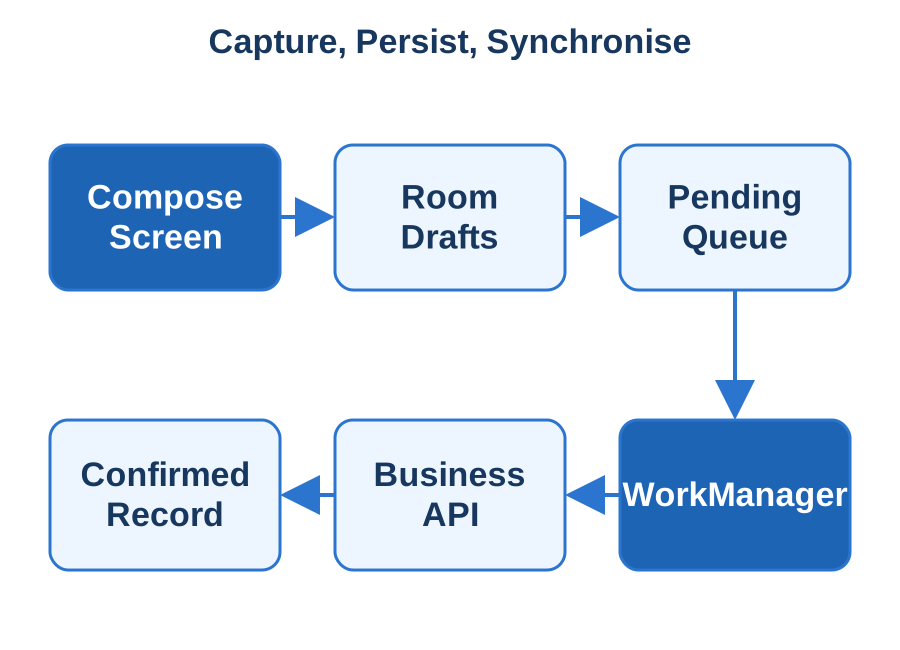
Keep work safe on the device. A captured inspection remains available after the screen closes. Drafts and queued actions are stored locally and reconciled with the server, which stays authoritative for prices, permissions and committed records.
Handle background work deliberately. Uploads and synchronisation run when the device allows, report their outcome and never repeat an order. We test battery settings, device-management restrictions and lost connections on representative hardware.
Agree the distribution route early. Public Google Play release, managed enterprise deployment and dedicated-device installation have different requirements.
Android screens preserve work locally and synchronise identified operations through a separate business API.
What you receive
The Android Studio project and an inventory of its dependencies.
The signed package required by your distribution channel, with signing instructions.
A handover record of supported devices, permission declarations and backend service interfaces.
Support procedures for network, device and service failures.
How we engage
You retain ownership of the signing keys, application identity and release accounts throughout. Acceptance verifies installation, sign-in, local work, synchronisation and an upgrade that loses no queued or confirmed work.
Technologies & Integration
Jetpack Compose — Kotlin native UI, Material 3 components, state management and interoperability with existing Android Views.
Room — SQLite entities, queries and migrations with an application-defined offline synchronisation protocol.
WorkManager — Persistent deferrable jobs with explicit execution constraints, retries and observable completion state.
Android Studio — Gradle builds, device debugging, signed App Bundles and enterprise APK delivery.
ASP.NET Core — Versioned C# APIs for records, identity, attachment transfer and selected notification or billing backends.
Installable Web Tools|Explicit Offline Behaviour|One Connected Product
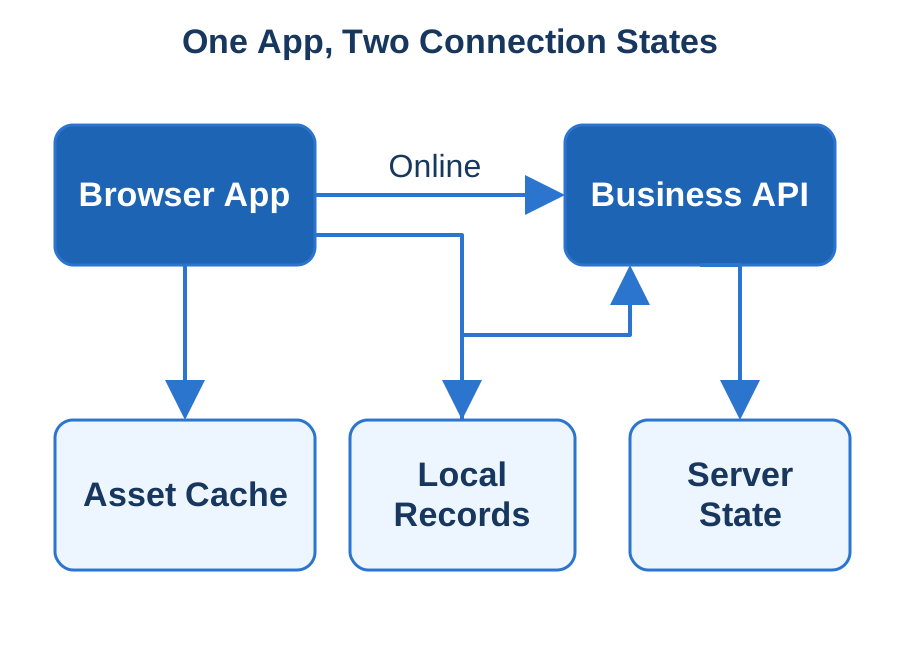
Sometimes the best app is one your users open from a link, install if they choose and keep using when the connection drops. Sphere 10 builds progressive web applications for customer portals, field tools, reference systems and operational interfaces, delivered as one web release in place of separate installed apps.
What we build
Define the offline promise. We list the screens, records and actions that must remain useful without a connection. That list becomes a feature you can test.
Build for the browsers your users have. Layouts suit narrow phones and keyboard-driven desktops. We build with React, Angular, Vue or Blazor, and agree a fallback where a browser lacks a capability.
Show what is saved and what is current. Users can tell a locally saved change from one awaiting upload or confirmed by the server, and can see when information is out of date.
Handle updates without losing work. New versions arrive around unfinished forms. Reconnection, expired sessions and duplicate submissions each get deliberate handling.
Protect data on shared devices. Personal data is cleared at sign-out or when the account changes.
The browser uses cached assets and local records while identified changes reconcile with the business service.
What you receive
Source code for the interface and backend changes, with reproducible build and deployment instructions.
A tested capability matrix for the agreed browsers and devices.
An offline and update test set built from representative business records.
Documentation covering local data retention, content and application updates, and support procedures.
How we engage
Acceptance uses the agreed Safari, Chromium and Firefox targets through online use, repeat visits, installation where supported, and offline and reconnection cases. Our ASP.NET Core services provide the validation and the integration with your existing systems.
Technologies & Integration
Web App Manifest — Install identity, icons, start URL and display behaviour verified in the selected browsers.
Service Workers — Scoped request handling, versioned caches and controlled installation/activation around in-progress work.
IndexedDB — Structured drafts and pending-operation storage with migration, retention and explicit server reconciliation.
ASP.NET Core — Authenticated business APIs with compatible versioning and idempotent submission contracts.
TypeScript — Typed browser UI and API clients, with Blazor WebAssembly available for an appropriate C# client stack.