Purpose-Built .NET|Purpose-Built Software|Connected Business Systems
When packaged software and spreadsheets no longer fit the way your business works, you need an application built around your own records, rules and systems. Sphere 10 builds .NET applications in C#, including desktop tools, web applications, background services and the integrations between them, and delivers each one with its data and the controls needed to run it every day.
What we build
Model your work. We turn your spreadsheets, manual procedures and system interfaces into a clear model of records, rules, user responsibilities and approvals.
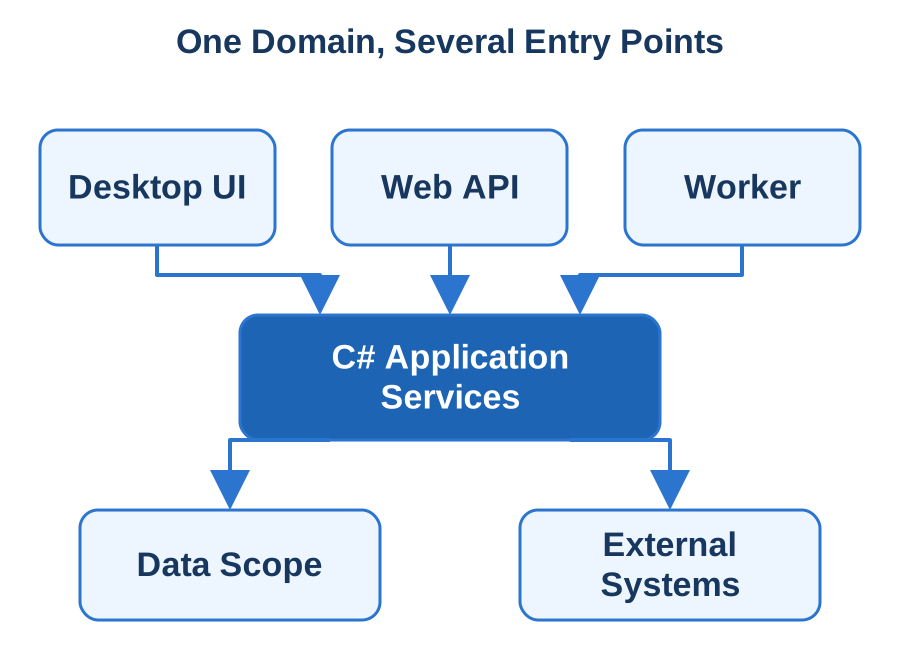
Keep rules in one place. A quoting workstation, an import service and a customer portal can share the same business logic, so each behaves consistently while its interface suits its users.
Choose the right data foundation. SQL Server suits shared business data and SQLite suits local records. We build on our own Sphere10 Framework where it reduces repeated plumbing, and your business decisions stay in your application.
Handle the difficult cases. Long-running work shows progress and can be cancelled. We test large volumes, concurrent edits, partial imports and interrupted processing, so a retry does not leave you with an uncertain result.
Desktop, web and background entry points share application operations above deliberate persistence and integration boundaries.
What you receive
A buildable solution with source, a dependency inventory and database changes.
Deployment instructions and a repeatable release process for your environment.
A demonstrated clean installation and an upgrade over existing records.
Diagnostics, backup procedures and support notes written for your operators.
How we engage
We start with one complete working slice: a real operator task or data-processing path built through validation, storage and its final result before the application expands. Acceptance examples agreed up front cover ordinary work, corrections and exceptions. Acceptance then follows whole business workflows through to their stored and integrated outcomes.
Technologies & Integration
.NET — Runtime, libraries and deployment targets for APIs, worker services and supported desktop/mobile hosts.
C# — Typed application services, asynchronous operations and explicit domain contracts shared across chosen hosts.
Sphere10 Framework — Compatible application, data, persistence, serialisation and diagnostic building blocks composed around your product's rules.
ASP.NET Core — HTTP APIs, authentication, authorisation and service integration with documented OpenAPI or gRPC contracts.
SQLite — Embedded relational storage with explicit schema migration, transaction and local-data recovery behaviour.
Razor on Your Device|Razor Components|Native Desktop Integration
If your team already builds interfaces in Blazor, or you want one interface shared between a web application and an installed product, Blazor Hybrid runs the same Razor components inside a native desktop or mobile application. Sphere 10 builds these applications with access to local files, device features and your backend services, packaged and installed like any native product.
What we build
Choose the host first. Your required platforms, device features and existing application decide the host: .NET MAUI for mobile and desktop, or WinForms or WPF for Windows integration.
Share what can be shared. A reporting workspace, record editor or guided workflow can reuse its web presentation, while file picking, printing and notifications use native services.
Keep screens separate from the work. Screens call defined application services, and the host supplies storage, credentials and device access. Privileged native operations sit behind a limited, validated interface.
Make offline work predictable. Local drafts, pending edits and confirmed server records are kept distinct, so the application recovers after a lost connection without submitting work twice.
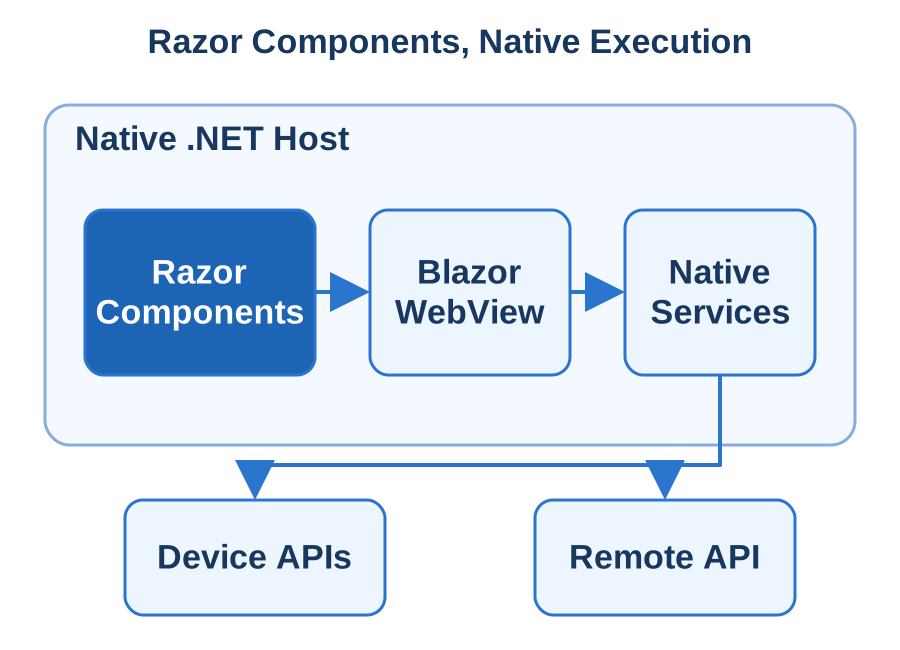
Razor components render through BlazorWebView while application and platform services run in the native host.
What you receive
The native host projects, shared component libraries and backend changes, with build instructions.
A reuse map showing which components are shared with your web application and which belong to the installed client.
A demonstrated clean install and upgrade on representative machines.
Upgrade and diagnostic procedures, with prerequisites and signing responsibilities recorded.
How we engage
We assess component compatibility, authentication, offline needs and deployment dependencies early, and test shared components in the actual host before extending the shared interface. Acceptance follows installation, sign-in, record editing and one native capability through to the resulting business record.
Technologies & Integration
Blazor Hybrid — Razor components running in native .NET and rendered by BlazorWebView, with explicit host service composition.
.NET MAUI — Cross-platform native application host, device adapters and distribution projects for the agreed supported targets.
WebView2 — Windows embedded-browser runtime, prerequisites and real-host testing for DOM, CSS and JavaScript dependencies.
ASP.NET Core — Authenticated remote APIs and compatible business contracts consumed by the installed Hybrid application.
When your people work on phones, tablets and desktops, often away from the office and sometimes without a connection, they need one application that behaves properly on each device. Sphere 10 develops .NET MAUI applications for Android, iOS, Windows and macOS from a shared C# codebase, including field tools, account applications, inspections and operational interfaces.
What we build
Start from the work and the hardware. A barcode scan, photograph, Bluetooth exchange or offline form can shape the design more than the number of screens. We prove the hardest device integration on real target hardware early.
Build native screens on shared logic. Each platform gets native controls, navigation and accessibility support, while your business rules are written once in shared code.
Connect to your backend. The server remains the authority for committed business records. The device keeps drafts and the reference information needed for the agreed offline workflow.
Design for interruptions. Mobile systems suspend applications mid-task. We save what is needed to resume safely, show progress for uploads and pending work, and prevent duplicates when a user retries after reconnecting.
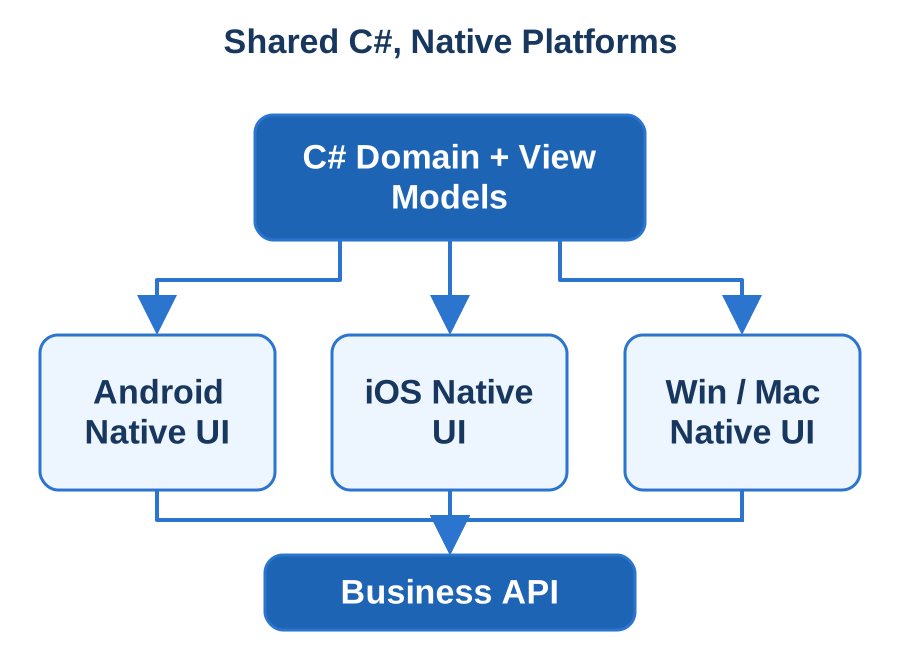
Shared view models and application operations connect to native controls and device services on the selected MAUI targets.
What you receive
The MAUI project, platform configuration and backend changes, with build instructions and a dependency inventory.
Build, signing and distribution configuration for each target, prepared for store submission, enterprise distribution or device installation as agreed.
Release checklists, supported devices and upgrade procedures.
A handover explaining the shared logic, platform-specific parts, configuration and diagnostics.
How we engage
We agree a device matrix at the start and test on representative devices, including permission changes, missing accessories and upgrades over existing local records. Acceptance demonstrates install, sign-in, core work, synchronisation and recovery through to the final result in your business system.
Technologies & Integration
.NET MAUI — Native C# application structure for Android, iOS, Mac Catalyst and Windows, with an explicit target matrix.
MAUI XAML — Shared native-control layouts, bindings and view-model contracts tailored to the application's tasks.
MAUI Handlers — Platform control mappings, focused native customisation and correctly owned native event subscriptions.
SQLite — Durable local records, migrations and pending operations coordinated with the server's reconciliation protocol.
ASP.NET Core — C# business APIs with authentication, validation and mobile-version compatibility.
C# Meets Native Code|C# and Native Code|One Reproducible Build
Some systems need more than one programming language: a vendor's device SDK in C++, a valuable native library you cannot rewrite, or a specialist calculation that belongs in native code. Sphere 10 connects C#, C++ and Rust components into one application, with boundaries that are deliberate, tested and understandable to the team that maintains it.
What we do
Give each language a job. We assess your existing code, dependencies and operating requirements before moving anything. C# often suits the application and business services, C++ an established device SDK, and Rust a component with strict memory and concurrency requirements.
Write the boundary contract first. The functions, data formats, memory ownership and failure behaviour are agreed before any wrapper is built. A small explicit interface is easier to prove and maintain.
Isolate fragile components. Crash-prone or independently deployed parts can run as a separate process, which gives a stronger failure boundary between them and your application.
Test past the first successful call. We test malformed data, maximum sizes, cancellation, shutdown during active work, missing libraries and incompatible versions, with memory diagnostics under stress.
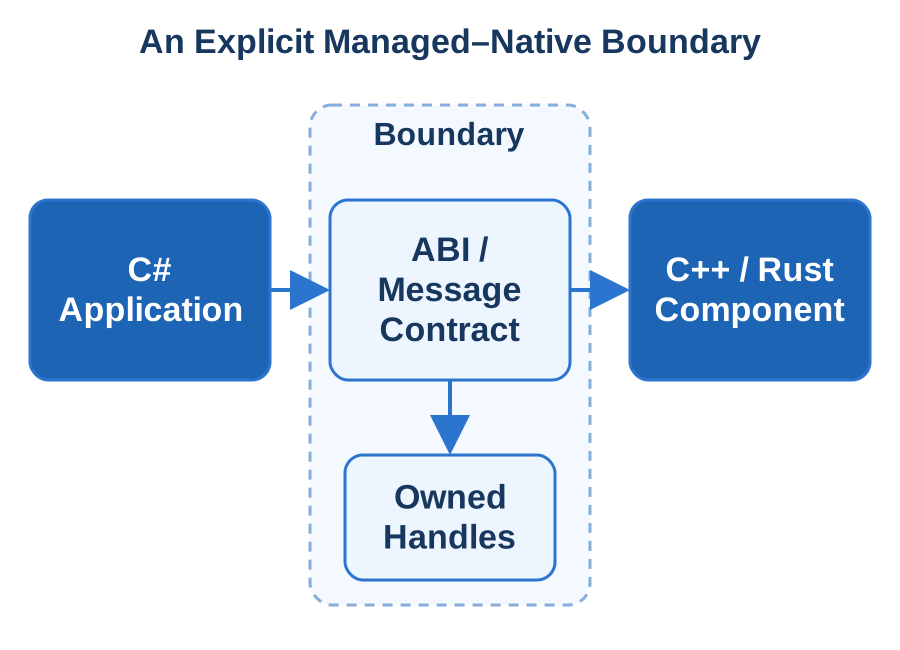
A typed .NET service crosses a documented ABI or message boundary, with resource ownership and error results defined.
What you receive
Wrapper source, interface definitions and compatibility tests.
One coordinated build covering every language and supported processor architecture, with compiler settings and dependency versions recorded.
Dependency licences and provenance.
A map showing which component owns what and where failures are contained.
How we engage
Design begins with an inventory of native dependencies, their licences and the processor architectures you support. We then test the boundary with realistic workloads and adverse inputs. Acceptance demonstrates the system loading and operating on clean target machines. We retain regression tests for every published interface, so a later component upgrade can be checked where it connects.
Technologies & Integration
.NET Interop — LibraryImport/P/Invoke wrappers with explicit ABI, string, buffer, ownership and callback-lifetime contracts.
Rust FFI — C-compatible exported interfaces and deliberate ownership/error boundaries between Rust and managed or native callers.
CMake — Reproducible native-library builds with declared compiler, architecture and linked dependency configuration.
Sphere10 Framework — Applicable pipes, TCP, JSON-RPC and shared application mechanisms composed around a versioned integration protocol.
One Core, Clear Targets|Shared Core|Explicit Platform Adapters
Supporting several operating systems should not mean building and maintaining the same product several times. Sphere 10 develops cross-platform applications with a shared business core and deliberate platform-specific parts, covering desktop products, background services and connected clients across the systems you agree to support.
What we do
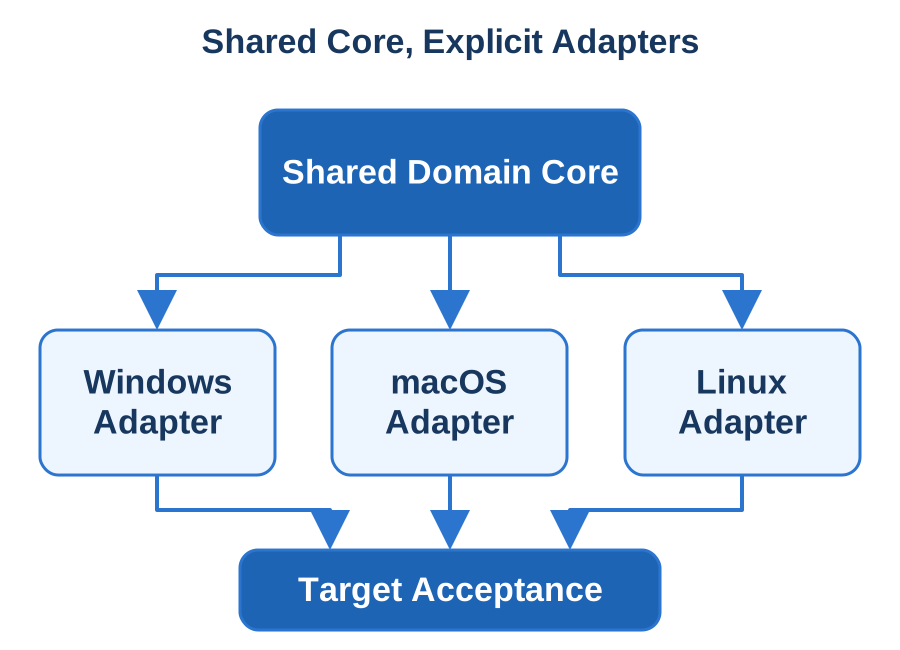
Define supported behaviour per target. We list the operating systems, processor architectures and essential integrations in a capability matrix, with agreed alternatives where a platform behaves differently.
Share the business core. Rules, calculations and data contracts are kept independent of any screen or operating system, so useful existing code survives a platform expansion.
Choose the interface for each target. We use Avalonia for Windows, macOS and Linux desktops, .NET MAUI for its mobile and desktop platforms, and Blazor or TypeScript for the browser.
Verify real differences. We test file handling, permissions, regional settings, time zones, network failures and upgrades on clean machines under ordinary user accounts, including Apple Silicon or Linux ARM64 where required.
A common domain and data contract connect to separate operating-system adapters and verified packages.
What you receive
Shared source, platform projects, build automation and packages for each agreed target.
A maintained target matrix, dependency map and platform test suite.
Signing, installation and update procedures defined for each target.
Platform-specific diagnostics and operating instructions for support.
How we engage
The capability matrix is the first design output and sets the acceptance expectations for every platform. Acceptance runs representative complete tasks on the actual operating-system and processor combinations, with upgrade and recovery demonstrated on each. Adding a platform later becomes a defined piece of work against the same shared model. Our own Local Notion product is distributed as a command-line tool for Windows, Linux and macOS.
Technologies & Integration
.NET Runtime IDs — Explicit OS/architecture assets and native dependency selection for supported service and application builds.
Avalonia — C# desktop UI across an agreed Windows, macOS and Linux support matrix with platform integrations tested separately.
ASP.NET Core — Shared HTTP business services and integration contracts hosted on the selected Windows or Linux environment.
Sphere10 Framework — Portable application/data mechanisms selected separately from platform-specific adapters and UI assemblies.
Your users notice the details of their own operating system: how the application installs, where it keeps files, how it updates and what happens when something fails. Sphere 10 develops desktop applications, command-line tools and background processes for Windows, macOS and Linux, and ports existing .NET software to the targets you choose, with those details treated as part of the product.
What we do
Match the experience to the product. A record-management workstation may suit one shared Avalonia interface. A scheduled data processor may be a service or command-line tool. Existing WinForms and WPF screens can stay on Windows while any migration is scoped separately.
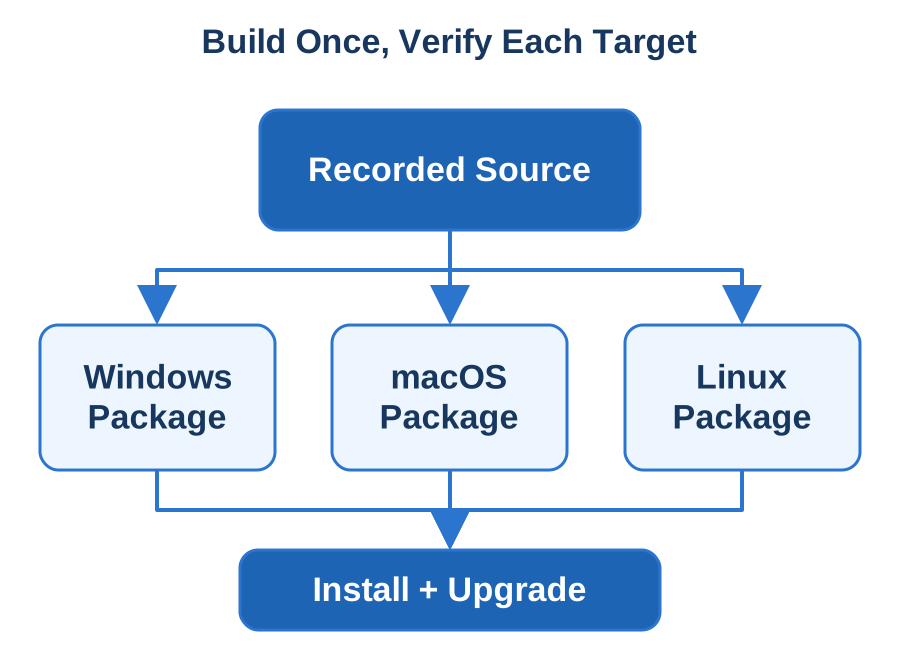
Package deliberately. Windows distribution can use MSIX or an installer, direct macOS distribution is signed and notarised, and Linux can use Flatpak. Your users' data is kept separate from the installed program files.
Integrate with each desktop. File dialogs, notifications, tray menus, shortcuts and device access are implemented for each platform, with the supported behaviour and fallback documented.
Test the installed environment. We install the real package under an ordinary account and check permissions, display scaling, keyboard conventions, proxies, certificates and offline behaviour.
A shared source build produces operating-system packages that are tested in their real installation environments.
What you receive
Application source, build instructions and target-specific packages with checksums and dependency records.
A tested installation and support matrix.
Release and recovery checklists for each platform.
Support notes covering log locations, permission checks and platform-specific failure paths.
How we engage
We agree the platform and processor-architecture matrix at the beginning, along with who owns signing identities and updates. Acceptance uses complete user tasks on each selected system, including clean install, repair, uninstall and an upgrade that keeps existing data.
Technologies & Integration
.NET Publishing — Framework-dependent or self-contained artifacts with explicit runtime identifiers and native dependencies.
Avalonia — Shared C# desktop UI across an agreed Windows/macOS/Linux matrix with separately implemented platform integrations.
MSIX — Windows package identity, declared capabilities and installation/update behaviour for the chosen distribution route.
Apple Notarisation — Developer ID signing, hardened-runtime preparation and notarisation for direct macOS distribution.
Flatpak — Linux application/runtime packaging with explicit sandbox permissions and tested host integration.
People who spend their working day in an application need to find records, make accurate changes, move quickly and see what the system has done. Sphere 10 builds and modernises desktop interfaces for record-heavy workstations, administration tools, specialist editors and device-connected software, using WinForms, WPF or Avalonia according to what the product needs.
What we build
Protect the operator workflow. We observe the shortcuts, record transitions and screen combinations your people rely on, and keep productive behaviour while improving what sits behind it.
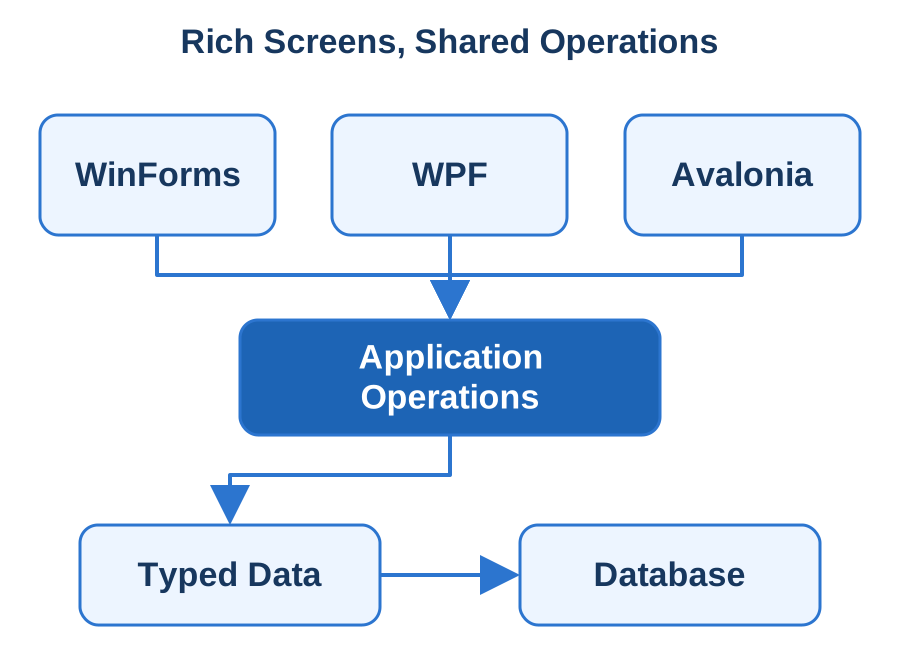
Choose the toolkit screen by screen. WinForms suits established Windows data-entry applications, WPF provides a more flexible Windows presentation model, and Avalonia shares one interface across Windows, macOS and Linux. Existing screens can be migrated incrementally.
Build data screens that hold up. Grids page, sort, filter and refresh sensibly at realistic volumes, validation messages are actionable, and column, filter and window preferences are remembered. Our Sphere10 Framework supplies WinForms data-entry components for this work.
Keep the interface responsive. Long reads, calculations and exports show progress and can be cancelled, and errors say whether a change was saved.
Toolkit-specific screens call application operations and typed record access without embedding business policy in controls.
What you receive
Interface projects, shared application components, build configuration and deployment instructions.
A screen and service map, with a component inventory and migration notes.
A verified upgrade that keeps existing settings.
Acceptance examples retained for future releases.
How we engage
Design starts with a catalogue of your grids, editors, reports, device integrations and keyboard workflows, prioritised by operator friction and maintainability. Acceptance demonstrates daily workflows with representative records and permission levels, including keyboard-only use, high-DPI displays and multiple monitors on your supported workstations.
Technologies & Integration
WinForms — Windows designer/event-based controls, data editing and UI-thread-safe asynchronous workflows.
WPF — Windows XAML, binding, styles and view models with deliberate Dispatcher ownership and responsive data operations.
Avalonia — C#/XAML desktop presentation and platform adapters tested on the agreed Windows/macOS/Linux targets.
Sphere10 Framework — WinForms CrudGrid/CRUD editors and compatible application/data mechanisms, with each assembly's target retained.
A finished application still has to reach its users, install cleanly and keep updating. Sphere 10 takes your working source through packaging, signing, test builds and release materials for the Microsoft Store, Apple's App Store, Google Play, managed enterprise channels or direct download, and leaves you with a release process your team can repeat.
What we do
Choose the route first. A store submission, an enterprise catalogue, an installer and a portable archive serve different needs. The route decides package identity, signing, review materials and installation behaviour.
Keep publisher identity under your control. We agree who owns store accounts, signing keys and application identifiers before packaging, because those assets decide how future versions reach existing users.
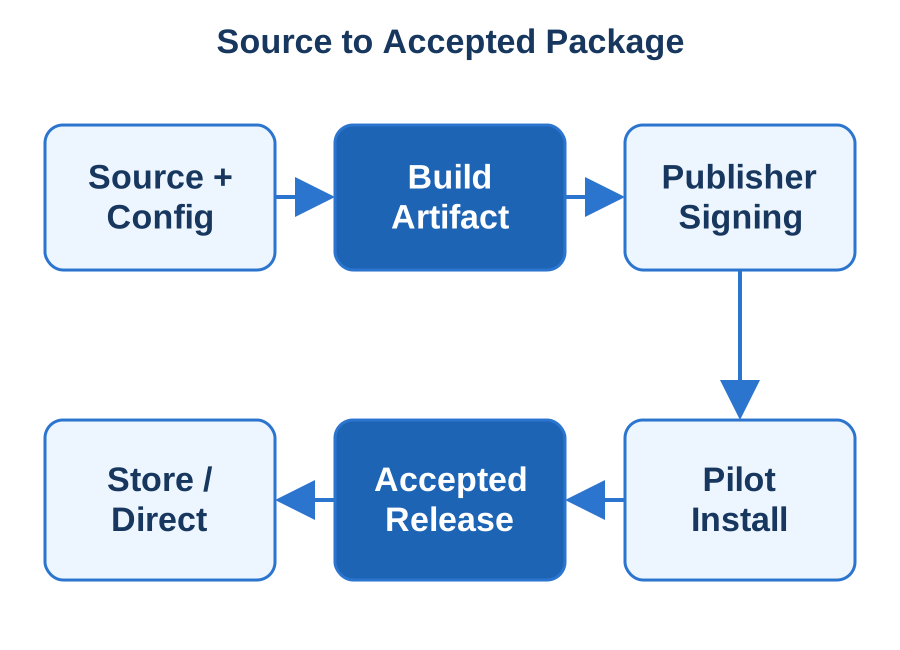
Produce a traceable build. Each release records its source revision, dependency versions, configuration and produced packages. Credentials stay out of source files and build logs.
Test what users will install. The exact signed package is installed on a clean machine or device, then upgraded over an existing version. TestFlight, Google Play testing tracks or a managed pilot channel carry the test build.
Prepare the listing. Icons, screenshots, descriptions and permission explanations are checked against what the application actually does.
A traceable build moves through signing, installation checks and the chosen distribution channel.
What you receive
Packaging scripts, reproducible build commands and channel-specific release instructions.
Submission metadata, release assets and the submission checklist.
A record of account and signing responsibilities.
A tested update and recovery procedure.
How we engage
We check current channel requirements against your application at submission time and tie any review feedback to the exact package under review. Handover includes a demonstration of producing and verifying the next version. Our own AutoMouse and Local Notion products give us direct experience of packaging and distributing .NET software.
Technologies & Integration
.NET Publishing — Traceable framework-dependent/self-contained builds with explicit runtime, architecture and native dependency choices.
MSIX — Windows packaging, identity and install/update verification for the selected channel.
TestFlight — Installable Apple beta distribution and acceptance before the App Store submission workflow.
Android App Bundles — Google Play publishing artifacts, with app-signing/upload-key ownership and real-device installation tests.
Apple Notarisation — Developer ID signing and notarisation for direct Mac distribution, with traceable ticket and artifact checks.