How to Compose Loggers from Sinks and Decorators in C#
Logging requirements rarely stay simple. The same message has to reach a file and a console, the file has to stay under a size limit, some destinations want debug detail and others only warnings, and every line needs a timestamp or a component name. Building that into one logger class produces a long list of switches.
Sphere10 Framework splits the job into small pieces behind one ILogger interface. Sinks write messages somewhere, decorators change a message on its way through, and a multicast logger fans one call out to several chains. This article shows how the pieces fit, how level filtering works, and how to expose the result to a whole application through SystemLog.
1. Compose a logger
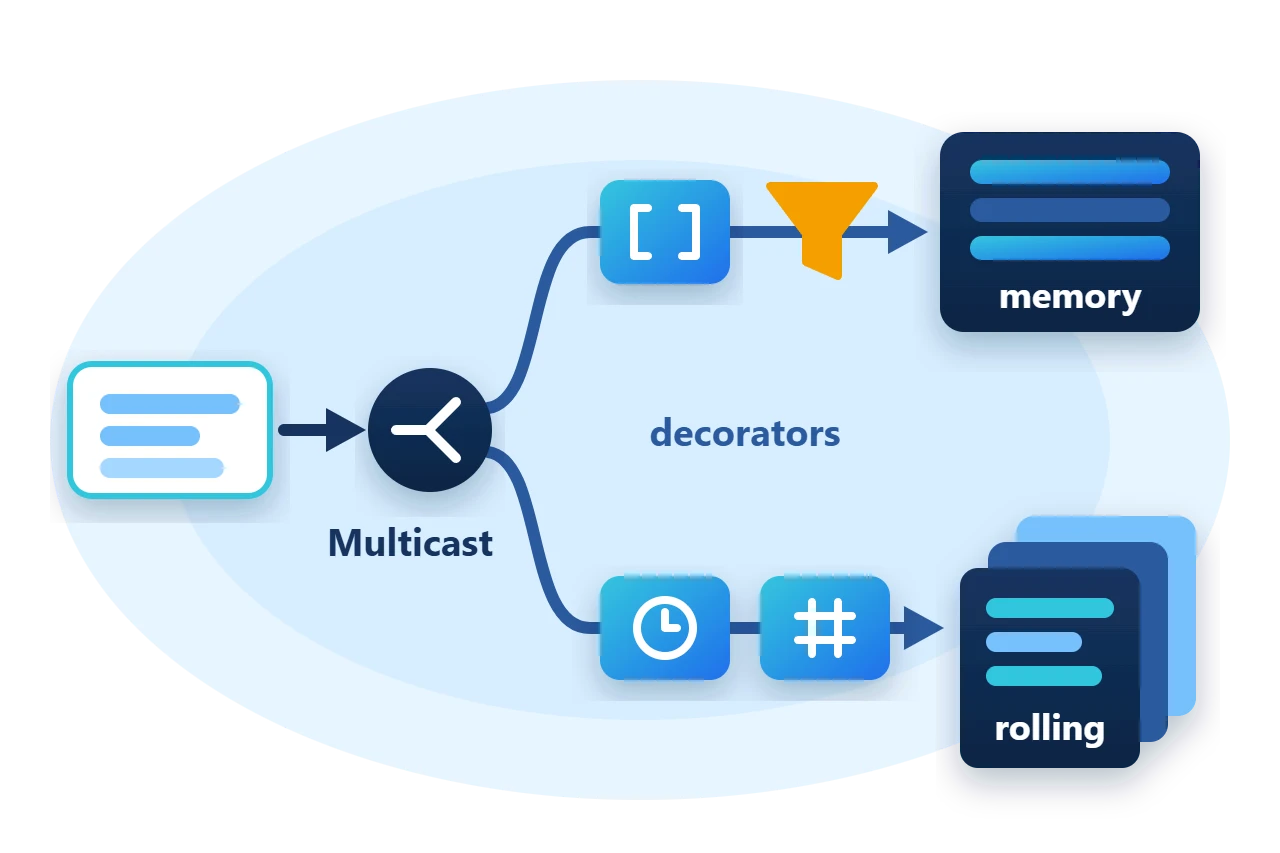
The sample builds two chains and joins them. One keeps Info and above in memory with a prefix. The other writes everything to a size-limited file with a timestamp and the thread ID.
// A sink that keeps lines in memory, limited to Info and above.
var lines = new List<string>();
var memory = new ActionLogger(lines.Add) { Options = LogLevel.Info.ToLogOptions() };

// A size-limited file sink. It owns an open writer, so it is disposed.
using var file = new RollingFileLogger(logFile, maxFiles: 3, maxFileSize: 512);

// Decorators add text, and the multicast logger fans each call out to both chains.
var logger = new MulticastLogger(
	new PrefixLogger(memory, "[worker] "),
	new TimestampLogger(new ThreadIdLogger(file))
);
The object graph that results is a tree. A call enters at the top and travels down each branch.
The rest of the application sees one ILogger.
logger.Debug("cache warmed");
logger.Info("service started");
logger.Warning("retrying request");
logger.Exception(new InvalidOperationException("request failed"), "Request 42");
The memory chain receives three of these four calls, because its sink filters out Debug. The file chain receives all four.
2. The pieces behind ILogger
ILogger has one method for each level, Debug, Info, Warning and Error, plus Exception, and an Options property that selects which of them are enabled. Two base classes implement it in different ways.
A sink derives from LoggerBase. The base class filters each call against Options and leaves one method, Log(level, message), for the sink to write. A decorator derives from LoggerDecorator, which forwards every call and Options to an inner logger, so a decorator overrides only what it changes.
The Framework ships these sinks.
-
ConsoleLoggerandDebugLoggerwrite[Level] messagelines to the console and the debugger output. -
FileAppendLoggerappends to one file. -
RollingFileLoggerappends to a file and archives it when it reaches a size limit. -
TextWriterLoggerwrites to anyTextWriter. -
ActionLoggerpasses each message to a delegate. -
NoOpLoggerdiscards everything.
It also ships these decorators.
-
TimestampLogger,ThreadIdLoggerandPrefixLoggerprepend text. -
SynchronizedLoggerserializes calls from several threads under a lock. -
AsyncLoggerqueues every call on a serial worker so that the caller does not wait for the sink.
3. Filter by level
Options is a set of LogOptions flags, one for each level and one for exception detail. Set it from a minimum level or from one of the predefined profiles.
| Value | Enables |
LogLevel.Info.ToLogOptions() |
That level, every higher level and exception detail |
LogOptions.VerboseProfile |
Everything |
LogOptions.StandardProfile |
Warnings, errors and exception detail |
LogOptions.UserDisplayProfile |
Info, warnings and errors without exception detail |
Filtering happens in the sink, so each branch of a multicast logger can have its own level. Setting Options on a decorator sets it on the logger it wraps, and setting it on a MulticastLogger applies the value to every child.
Exception(error, message) writes at the error level. With the exception-detail flag the text is the full diagnostic string including the stack trace, and without it the text is the display message only.
4. Measure a block and log application-wide
EnterLogDurationScope returns a scope that logs the elapsed milliseconds at debug level when it is disposed.
using (logger.EnterLogDurationScope("import batch"))
	logger.Info("importing");
SystemLog is a static multicast logger for code that has no logger passed to it. It starts with no sinks, so nothing is written until one is registered.
SystemLog.RegisterLogger(logger);
SystemLog.Info("Program", "Main", "logged through SystemLog");
SystemLog.DeregisterLogger(logger);
The overloads that take a component and a method name prefix the message with [Component::Method]. The same overloads exist as extension methods on every ILogger.
5. Keep log files bounded
RollingFileLogger takes the path of the active file, the number of files to keep and the maximum size of each in bytes. When the next line would exceed the size, it renames the active file with a timestamp, such as app_20261110093000.log, starts a new one and deletes the oldest archives beyond maxFiles. The defaults are 10 files of 1,000,000 bytes.
The sample uses a 512-byte limit and three files, writes 40 more lines and then checks the directory.
var files = Directory.GetFiles(directory, "app*.log");
Require(files.Length == 3, "The rolling file logger did not keep exactly three files.");
Require(files.All(path => new FileInfo(path).Length <= 512), "A log file exceeded its size limit.");
6. Ownership and limits
-
Sinks swallow their own failures. A sink that cannot write does not throw into the application, and
MulticastLoggerignores an exception from one child and continues with the others. A logging failure is therefore silent. -
Dispose the rolling file logger. It holds an open file writer. The other sinks and the decorators hold nothing that needs disposal.
-
Default levels depend on the build. A sink derived from
LoggerBasestarts with the verbose profile in a debug build and the standard profile otherwise, which omitsDebugandInfo. The text-writer and rolling-file sinks set the verbose profile themselves. SetOptionsexplicitly when the level matters. -
Messages are strings. The loggers do not take structured properties or message templates.
7. Get the package and run the sample
The loggers are in the Sphere10.Framework namespace of the Sphere10.Framework NuGet package. The sample targets .NET 10.
dotnet new console --framework net10.0 --name ArticleSample
cd ArticleSample
dotnet add package Sphere10.Framework
The complete MIT-licensed sample contains the program shown in this article. Extract the download over the generated project and run it against a new directory.
dotnet run -c Release -- ./fresh-logsMemory sink kept 3 of 4 messages; first: [worker] service started
File sink kept 10 lines, including the debug message and the duration
SystemLog reached the registered logger: [worker] [Program::Main] logged through SystemLog
Rolling file sink kept 3 files of at most 512 bytesThe logging guide lists every logger, and the text writers behind the sinks have their own guide.
The Sphere10 Framework overview describes the rest of the toolkit.
Author: Herman Schoenfeld
