How to Schedule Background Jobs In-Process in C#
Many applications need a few recurring tasks, such as refreshing a cache, flushing a buffer or cleaning up expired data. A Timer for each task works until the tasks need different intervals, a limit on the number of runs, a pause and resume, or one place that decides what happens when a task throws.
Scheduler in Sphere10 Framework runs any number of jobs from a single timer inside the process, with no external service. This article shows how to build jobs and schedules with JobBuilder, how the scheduler orders and runs them, how job status and errors are reported, and where the limits are.
1. Build jobs and schedules
JobBuilder.For starts a job from a delegate. Called names it, and Repeat opens the schedule builder.
var tick = JobBuilder
	.For(() => Interlocked.Increment(ref ticks))
	.Called("Tick")
	.Repeat.OnInterval(TimeSpan.FromMilliseconds(100), totalIterations: 3)
	.Build();

var once = JobBuilder
	.For(() => Interlocked.Increment(ref onceRuns))
	.Called("Once")
	.RunOnce(DateTime.UtcNow.AddMilliseconds(150))
	.Build();
The schedule methods cover the common timings.
| Method | Runs the job |
RunOnce(start) |
Once, at a given time |
Repeat.OnInterval |
After each interval |
Repeat.OnDayOfWeek |
On a weekday at a time of day |
Repeat.OnDayOfMonth |
On a day of the month at a time of day |
The repeating schedules accept totalIterations and endDate to stop them. OnInterval also takes a ReschedulePolicy. With OnFinish, the default, the next interval is measured from the end of the previous run, so a slow job never overlaps itself. With OnStart it is measured from the start.
A job can also be a type. JobBuilder.For(typeof(T)) takes a class that implements ISchedulerJob, and the scheduler creates a new instance of it for every run.
public sealed class CountingJob : ISchedulerJob {
	private static int _runs;

	public static int Runs => _runs;

	public void Execute(IJob job) => Interlocked.Increment(ref _runs);
}var typed = JobBuilder
.For(typeof(CountingJob))
.Called("Typed")
.Repeat.OnInterval(TimeSpan.FromMilliseconds(100), totalIterations: 2)
.Build();2. How the scheduler runs jobs
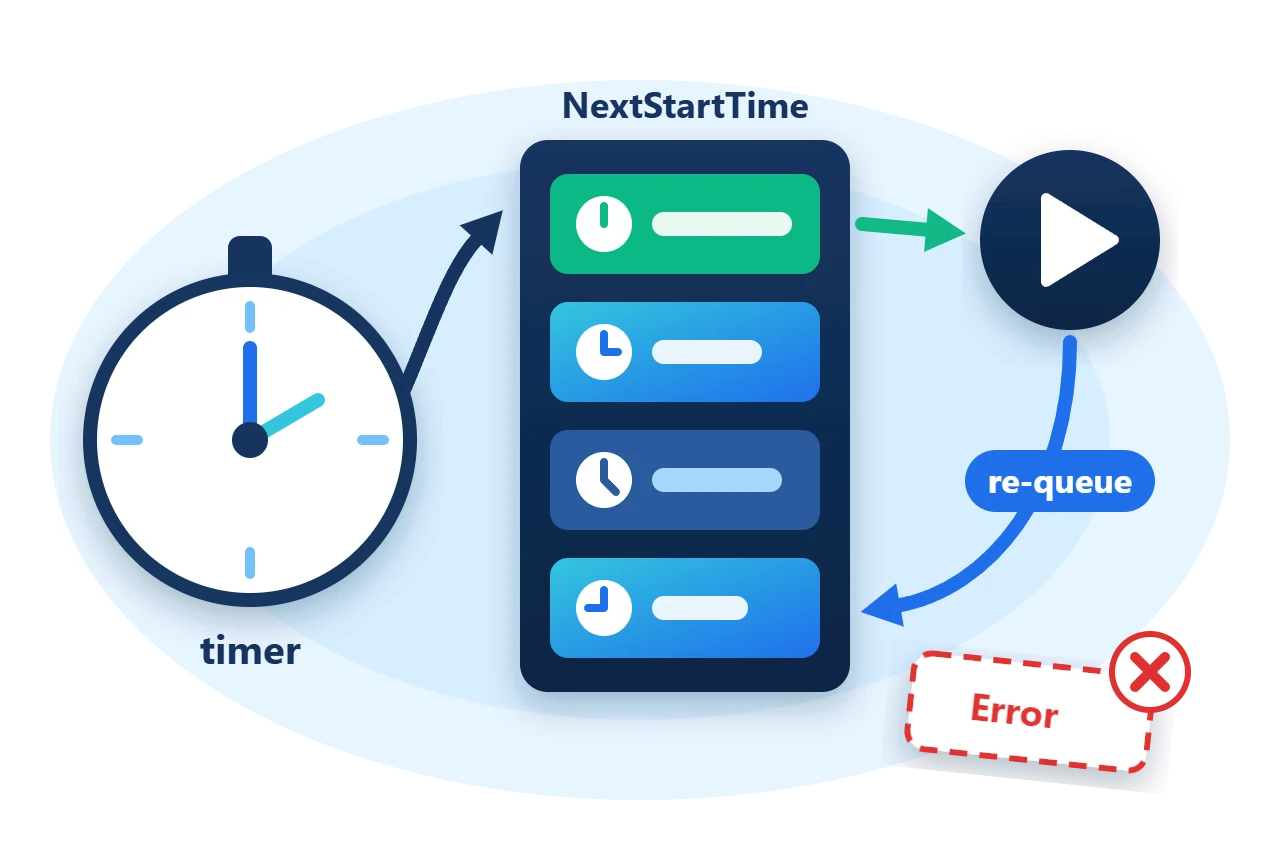
A job is the work, and a schedule says when it runs. One job can own several schedules. The scheduler keeps every schedule in a heap ordered by NextStartTime, sets its one timer for the earliest of them and sleeps. When the timer fires, it takes each schedule that is due, runs its job and puts the schedule back if it has iterations left.
A job whose policy includes JobPolicy.Asyncronous, which is the default, is executed on a thread-pool thread. Other jobs run inline in the timer callback, one after another.
3. Start the scheduler and observe jobs
A scheduler you create is off until Start() is called, and jobs added before then wait in the Paused status.
using var scheduler = new Scheduler(SchedulerPolicy.DontThrow | SchedulerPolicy.RemoveJobOnError);
scheduler.OnJobError = (job, error) => errors.Enqueue($"{job.Name}: {error.Message}");
scheduler.JobStatusChanged += (job, oldStatus, newStatus) => transitions.Enqueue($"{job.Name}:{newStatus}");scheduler.AddJob(tick);
scheduler.AddJob(once);
scheduler.AddJob(failing);
scheduler.AddJob(typed);
Require(tick.Status == JobStatus.Paused && scheduler.Status == SchedulerStatus.Off, "Jobs ran before the scheduler started.");
scheduler.Start();
Each job reports its progress through JobStatus, and JobStatusChanged is raised on every transition.
PauseJob, ResumeJob, RescheduleJob and RemoveJob change one job while the scheduler keeps running, and Stop() pauses them all. OnBeforeJobBegin and OnAfterJobEnd are callbacks around every run.
4. Decide what a failing job does
The SchedulerPolicy flags passed to the constructor decide how an exception from a job is handled. OnJobError is called first in every case.
-
DontThrowkeeps the exception inside the scheduler, so one failing job cannot break the timer callback. -
RemoveJobOnErrorremoves the job and sets its status toError, so it does not run again. -
ForceSyncronousmakes the scheduler run every job inline, and it then accepts only jobs built withRunSyncronously(). -
DisposeWhenFinisheddisposes the scheduler when no schedules remain.
The sample adds a job that always throws.
var failing = JobBuilder
	.For(() => throw new InvalidOperationException("job failed"))
	.Called("Failing")
	.Repeat.OnInterval(TimeSpan.FromMilliseconds(100))
	.Build();
It runs once, OnJobError receives the exception, and the job is removed while the other three carry on.
Scheduler.Asynchronous and Scheduler.Synchronous are shared instances that are already started with DontThrow and RemoveJobOnError. They suit small background tasks that do not need their own lifetime.
5. Limits
-
In-process only. Jobs live in memory and stop with the process. Nothing runs a missed job after a restart.
-
A job's policy must match the scheduler's. Adding a synchronous job to an asynchronous scheduler, or the reverse, throws
InvalidOperationException. -
Delegate jobs cannot be saved.
ToSerializableSurrogate()andFromSerializableSurrogate()persist and restore schedules as XML-serializable objects, but only type-basedISchedulerJobjobs can be restored. -
Callbacks run on scheduler threads.
JobStatusChanged,OnJobErrorand asynchronous jobs run on timer or thread-pool threads, so shared state needs its own synchronization.
Dispose a scheduler you created when it is no longer needed.
6. Get the package and run the sample
The scheduler is in the Sphere10.Framework namespace of the Sphere10.Framework NuGet package. The sample targets .NET 10.
dotnet new console --framework net10.0 --name ArticleSample
cd ArticleSample
dotnet add package Sphere10.Framework
The complete MIT-licensed sample contains the two files shown in this article. Extract the download over the generated project and run it.
dotnet run -c ReleaseThe program waits for the jobs to finish, checks the counts and statuses, and prints three lines.
Interval job ran 3 times, one-shot job ran 1 time, typed job ran 2 times
Failing job reported "Failing: job failed" and ended as Error
Tick transitions: Initialized > Paused > Scheduled > Started > Completed
The scheduler guide lists every job, schedule and surrogate type.
The Sphere10 Framework overview describes the rest of the toolkit.
Author: Herman Schoenfeld
