How to Autosave Changed Objects in an ObjectSpace
An ObjectSpace writes an object when you call Save. In code that loads objects, passes them through several methods and changes some of them, tracking which ones still need a Save becomes a second job, and a missed call silently loses a change.
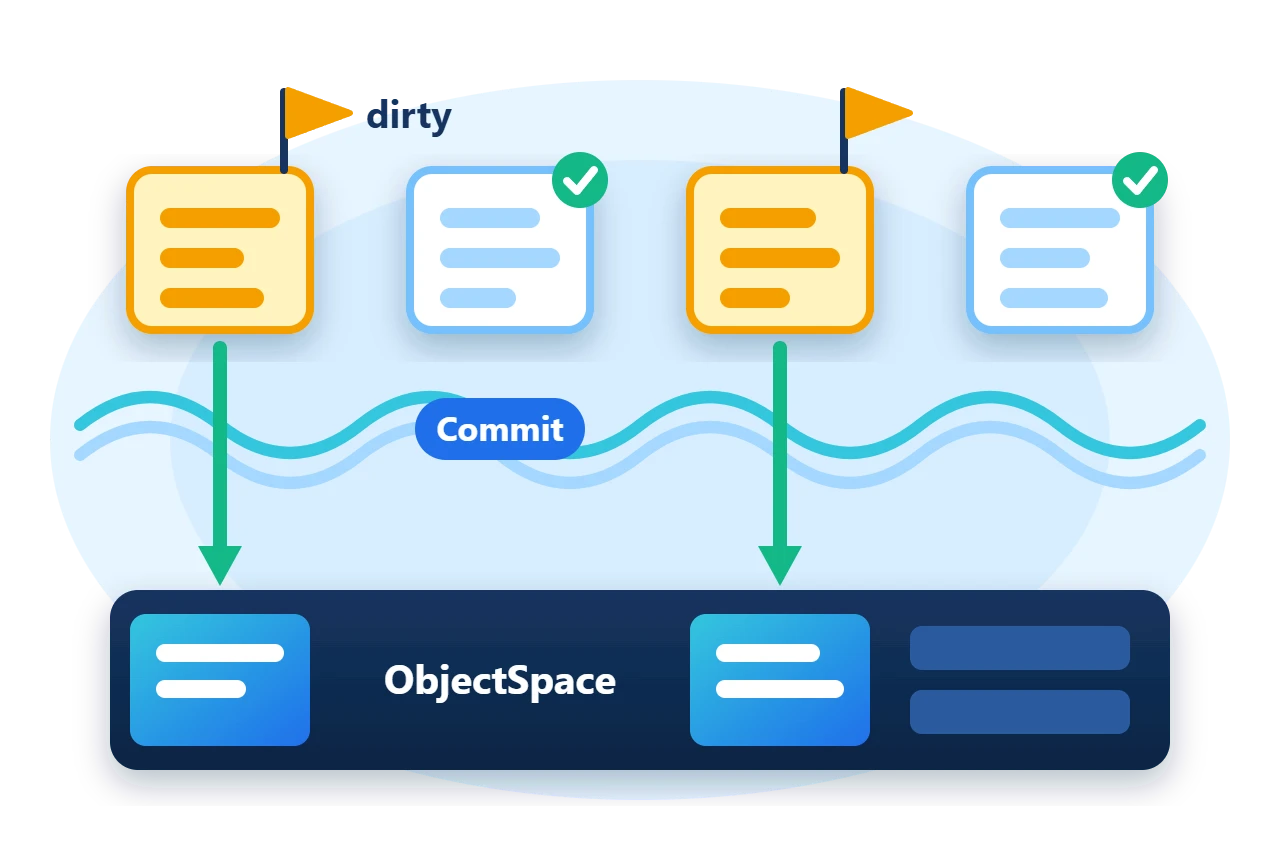
Autosave removes that bookkeeping. Each object carries a dirty flag, the ObjectSpace saves every tracked object whose flag is set when it flushes or commits, and a source generator can maintain the flag for you. This article shows how to enable autosave, how the flag is set and cleared, and how the [AutoDirty] generator implements it.
1. A first look
With autosave on, the code creates and changes objects and ends the unit of work with Commit(). There is no Save call.
var customer = space.New<Customer>();
customer.Id = 1;
customer.Email = "[email protected]";
customer.Region = 7;
customer.Name = "Ana";
var purchase = space.New<Purchase>();
purchase.Id = 100;
purchase.Reference = "P-100";
purchase.CustomerId = 1;
purchase.Total = 120m;
Require(customer.Dirty && purchase.Dirty, "New objects were not marked dirty.");
space.Commit();
Require(!customer.Dirty && !purchase.Dirty, "Commit did not clear the dirty flags.");
New<T>() hands back each object already marked dirty, and Commit() saves both objects and clears their flags. The later sections build the two model classes and the store configuration that these lines rely on.
2. How autosave works
Autosave has two parts. The model exposes a bool member that is true while the object has unsaved changes, and each dimension tells the ObjectSpace which member that is. With AutoSave() enabled, Flush() and Commit() walk the objects the space is tracking and call Save on each one whose flag is set.
The ObjectSpace maintains the flag at three points.
-
New<T>()andAcceptNewset it, so a new tracked object is saved without an explicit call. -
Saveclears it after writing the object and updating its indexes. -
Loading an object clears it, so a freshly fetched object is clean.
Setting the flag when a property changes is the model's job.
3. Track changes by hand
The flag can be maintained with ordinary code. This class sets it in the one setter that is tracked.
public sealed class Purchase {
	private decimal _total;

	[Transient]
	public bool Dirty { get; set; }

	public long Id { get; set; }

	public string Reference { get; set; }

	public long CustomerId { get; set; }

	public decimal Total {
		get => _total;
		set {
			if (_total == value)
				return;
			_total = value;
			Dirty = true;
		}
	}
}
[Transient] keeps the flag out of the serialized object, since it describes the in-memory instance and not the record. Only Total participates here. A change to Reference does not set the flag, so autosave will not write it.
4. Generate the tracking with AutoDirty
Writing that setter for every property is repetitive, and one forgotten property is a lost update. The [AutoDirty] attribute names the flag, and the generator implements every partial property of the class.
[AutoDirty(nameof(Dirty))]
public sealed partial class Customer {
	[Transient]
	public bool Dirty { get; set; }

	public partial long Id { get; set; }

	public partial string Email { get; set; }

	public partial int Region { get; set; }

	public partial string Name { get; set; }
}
For each partial property the generator emits a backing field and a setter equivalent to the following, which sets the flag only when the new value differs from the current one.
private string _autoDirty_name;

public partial string Name {
	get => _autoDirty_name;
	set {
		if (!System.Collections.Generic.EqualityComparer<string>.Default.Equals(_autoDirty_name, value)) {
			_autoDirty_name = value;
			Dirty = true;
		}
	}
}
The generator never clears the flag. The ObjectSpace does that when it saves the object.
5. Enable autosave on the store
Call AutoSave() on the builder and WithChangeTrackingVia on every dimension.
var builder = new ObjectSpaceBuilder()
	.UseFile(Path.Combine(directory, "sample.s10"))
	.KeepUncommittedPagesAt(Path.Combine(directory, "pending-pages"))
	.AutoSave()
	.AutoLoad();
builder.AddDimension<Customer>(ignoreAnnotations: true)
	.WithIdentifier(item => item.Id)
	.WithUniqueIndexOn(item => item.Email)
	.WithIndexOn(item => item.Region)
	.WithChangeTrackingVia(item => item.Dirty)
	.Done();
Autosave requires every dimension to name its flag. The builder rejects a definition in which one of them does not.
6. Let commit save the changes
With the store configured, the code in the first look needs nothing more. The application obtains tracked objects, their setters mark them dirty, and Commit() saves the dirty objects and publishes the pages.
Later changes follow the same path. Assigning a value equal to the current one leaves the object clean, so nothing is written for it.
customer.Region = 7;
Require(!customer.Dirty, "Assigning the same value marked the object dirty.");
customer.Region = 9;
purchase.Total = 150m;
Require(customer.Dirty && purchase.Dirty, "Changed objects were not marked dirty.");
space.Commit();
7. Limits to plan for
-
Autosave sees only the flag. A property that does not set it is not saved. The sample changes
Purchase.Reference, commits, and finds the old value after reopening. CallSaveexplicitly, or set the flag, for members outside the tracking. -
Only tracked objects are saved. Autosave covers objects obtained from the space through
New,AcceptNew,GetorGetAll. An instance the space has never seen needsSaveorAcceptNewfirst. -
Flush is not commit. In a file-backed space,
Flush()saves dirty objects into pending pages. They become durable atCommit()and are discarded byRollback(). -
Rollback replaces tracked objects. After a rollback, fetch objects again before changing them.
-
Mutable members hide changes. Changing an element inside an array or list property does not assign the property, so the flag is not set.
8. Get the package and run the sample
ObjectSpace ships in Sphere10.Framework. The generator is a separate development-only package that adds no runtime assembly.
dotnet new console --framework net10.0 --name ArticleSample
cd ArticleSample
dotnet add package Sphere10.Framework
dotnet add package Sphere10.Framework.Generators
Mark the generator reference with PrivateAssets="all" in the project file, as the complete MIT-licensed sample does. The generator needs the compiler of the .NET 10 SDK, and partial properties need C# 13 or later.
Extract the download over the generated project and run it against a new directory.
dotnet run -c Release -- ./fresh-dataNew objects saved by Commit without a Save call
Changed objects saved by Commit; unchanged assignment ignored
Reopened: region 9, total 150, reference P-100
The
ObjectSpace guide
documents autosave with the other builder options, and the
generator guide
lists the rules for [AutoDirty] classes.
The Sphere10 Framework overview describes the rest of the toolkit.
Author: Herman Schoenfeld
