How to Add Bounds, Hashing and Encryption to Any Stream in C#
Code that works on a Stream often needs one extra rule that the stream itself does not provide. A reader should see only part of a file, a writer should produce a digest of what it wrote, the bytes should be encrypted at rest, or a helper should not be able to close a stream it was lent. Building each rule into every reader and writer couples them to one kind of stream.
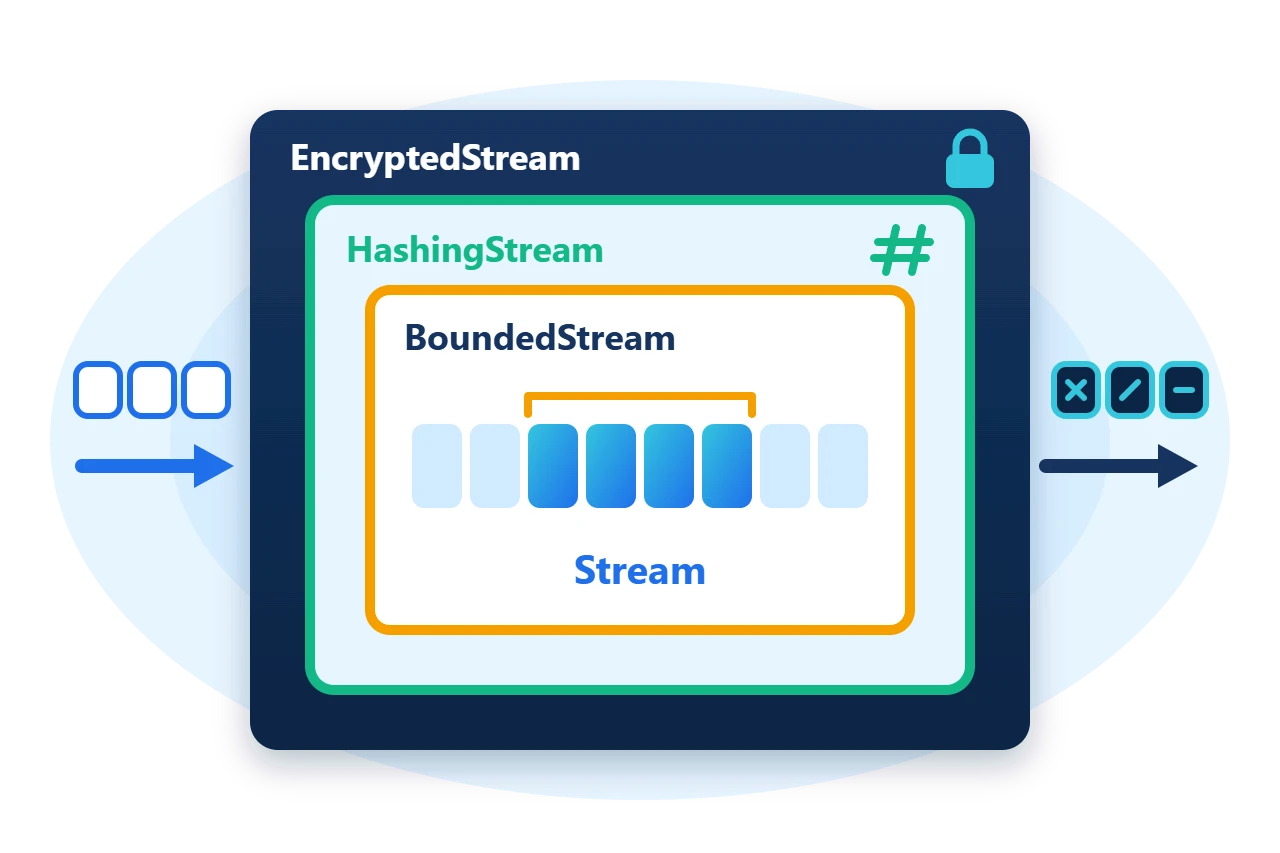
Sphere10 Framework supplies these rules as stream decorators. Each one wraps an existing Stream, changes a single behaviour and is itself a Stream, so it can be passed to any API and stacked with the others. This article covers the decorator base class and five of the decorators built on it.
1. Confine access to a region
BoundedStream restricts reads and writes to one segment of the inner stream. Its constructor takes the inner stream, the first position of the segment and the segment's length. With UseRelativeAddressing set, position 0 of the bounded stream is the first byte of the segment.
using var file = new MemoryStream();
file.SetLength(48);

// Two views over one stream: bytes 0-15 and bytes 16-47, each addressed from zero.
var header = new BoundedStream(file, 0, 16) { UseRelativeAddressing = true, AllowInnerResize = false };
var body = new BoundedStream(file, 16, 32) { UseRelativeAddressing = true, AllowInnerResize = false };
The two views divide the 48-byte stream as follows.
A write through body at position 0 lands at offset 16 of the file. A write that would cross the end of a view throws StreamOutOfBoundsException before any byte is written.
body.Position = 0;
body.Write(Encoding.ASCII.GetBytes("body"));
header.Position = 12;
var overflowRejected = false;
try {
	header.Write(new byte[8]);
} catch (StreamOutOfBoundsException) {
	overflowRejected = true;
}
AllowInnerResize decides whether SetLength on the view may resize the inner stream. Both views share the inner stream's cursor, so set Position on a view before each use when several views are active.
2. How a stream decorator is built
StreamDecorator<TStream> derives from Stream, holds an inner stream and forwards every member to it. A concrete decorator overrides only the members whose behaviour it changes. Most decorators come in a generic form that keeps the inner stream's type and a non-generic form over Stream.
StreamDecoratorExtensions adds fluent wrappers for the common cases, including AsReadOnly, AsWriteOnly, AsNonClosing and AsConcurrent.
3. Hash while writing
HashingStream is a write-only stream that feeds everything written to it into a hash function chosen from the CHF enumeration. GetDigest() returns the result and ends the stream's writable life.
using var hashing = new HashingStream(CHF.SHA2_256);
hashing.Write(data, 0, 600);
hashing.Write(data, 600, 400);
var digest = hashing.GetDigest();
The digest equals Hashers.Hash(CHF.SHA2_256, data) however the writes were divided. A serializer or exporter that writes to a Stream can therefore produce a digest without first building the whole output in memory.
4. Encrypt without changing length
EncryptedStream applies AES in counter mode. Writes encrypt and reads decrypt, the ciphertext has exactly the length of the plaintext, and any offset can be read or written on its own. The constructor takes the backing stream, a 16, 24 or 32-byte key and a 16-byte initial counter.
using var backing = new MemoryStream();
using (var writer = new EncryptedStream(backing, key, counter, leaveOpen: true))
	writer.Write(plain);

// Random access: decrypt five bytes from the middle without reading what precedes them.
using var reader = new EncryptedStream(backing, key, counter, leaveOpen: true);
reader.Position = 20;
var slice = new byte[5];
reader.ReadExactly(slice);EncryptedStream stores no header, padding or authentication tag. Keep the initial counter with the data, never reuse a key and counter pair for different plaintext, and authenticate the ciphertext separately before decrypting input you do not trust.
5. Restrict access and ownership
AsReadOnly() returns a view that reports CanWrite as false and throws NotSupportedException from every write member, and AsWriteOnly() does the reverse. AsNonClosing() returns a view whose Close leaves the inner stream open, which is the way to lend a stream to a consumer that disposes whatever it is given.
// A consumer that disposes what it is given cannot close the stream behind a non-closing view.
using (var reader = new BinaryReader(file.AsNonClosing()))
	reader.ReadInt32();
After the BinaryReader is disposed, file is still open.
6. Present fragments as one stream
FragmentedStream works in the other direction. It presents many separate byte fragments as one contiguous stream, with the fragments supplied by an IStreamFragmentProvider. ByteArrayStreamFragmentProvider keeps them as byte arrays and allocates another fragment of the chosen size whenever the stream grows.
var provider = new ByteArrayStreamFragmentProvider(newFragmentSize: 4);
using var stream = new FragmentedStream(provider);
var data = Encoding.ASCII.GetBytes("ten bytes!");
stream.Write(data);
Ten bytes occupy three four-byte fragments, and a read that starts at position 3 crosses fragment boundaries without the caller noticing. Implement IStreamFragmentProvider yourself to map a stream onto pages, blocks or any other non-contiguous storage.
7. Limits
-
Decorators are not thread-safe. Each one shares its inner stream's cursor.
AsConcurrent()wraps a stream so that every member requires the caller to hold its access scope. -
Dispose the outer decorator only. A decorator closes its inner stream unless it is non-closing or was created with
leaveOpen. -
Bounds are checks, not copies. A bounded view never moves data. It rejects access outside its segment of the same inner stream.
8. Get the package and run the sample
The stream types are part of the core Sphere10.Framework package, in the Sphere10.Framework namespace.
dotnet new console --framework net10.0 --name ArticleSample
cd ArticleSample
dotnet add package Sphere10.Framework
The complete MIT-licensed sample contains the program shown in this article. Extract the download over the generated project and run it.
dotnet run -c ReleaseBounded: body position 0 is file offset 16; write past the header rejected: True
Hashing: 32-byte digest matches a one-shot hash of the same bytes
Encrypted: ciphertext length 36 equals plaintext length; offset 20 decrypts to klmno
ReadOnly rejected a write: True; stream still open after its non-closing view was disposed: True
Fragmented: 10 bytes stored in 3 fragments of 4 bytesThe Streams guide lists every stream type in the folder, including the buffered, blocking and pipeline streams that this article does not cover.
The Sphere10 Framework overview describes the rest of the toolkit.
Author: Herman Schoenfeld
