How to Dispatch JSON-RPC Calls to C# Methods by Name
A JSON-RPC request names a method as text and passes its arguments as a JSON array. Something has to find the C# method that the name refers to, convert each JSON value to the parameter type, invoke the method and turn the outcome into a result or an error code. Written by hand, that is a switch statement and a pile of casts that grows with every method.
Sphere10 Framework's RPC registry does this from attributes. You mark a class and its methods, register an instance, and dispatch calls by name with JSON arguments. This article covers the attributes and naming rules, the registry, argument conversion, and the error codes a failed call returns.
1. Declare a service
A service is an ordinary class. [RpcAPIService] gives it a name, and [RpcAPIMethod] marks each method that may be called.
[RpcAPIService("math")]
public sealed class MathService {
	[RpcAPIMethod]
	public int Add(int a, int b) => a + b;

	[RpcAPIMethod("mul")]
	public float Multiply(float a, float b) => a * b;

	[RpcAPIMethod]
	public int Divide(int a, int b) => b == 0 ? throw new ArgumentException("Division by zero") : a / b;

	[RpcAPIMethod]
	public int[] Expand(Range range) => Enumerable.Range(range.From, range.Count).ToArray();
}
The registered name of a method follows a few rules.
| Declaration | Registered name |
| Service name plus method | math.add |
| Method with an alias | math.mul |
| No service name | The method name alone |
Names are stored in lower case and matched without regard to case. Repeating [RpcAPIMethod] with different aliases registers one method under several names, and [RpcAPIArgument] on a parameter renames that argument in the method's description.
2. Register and inspect
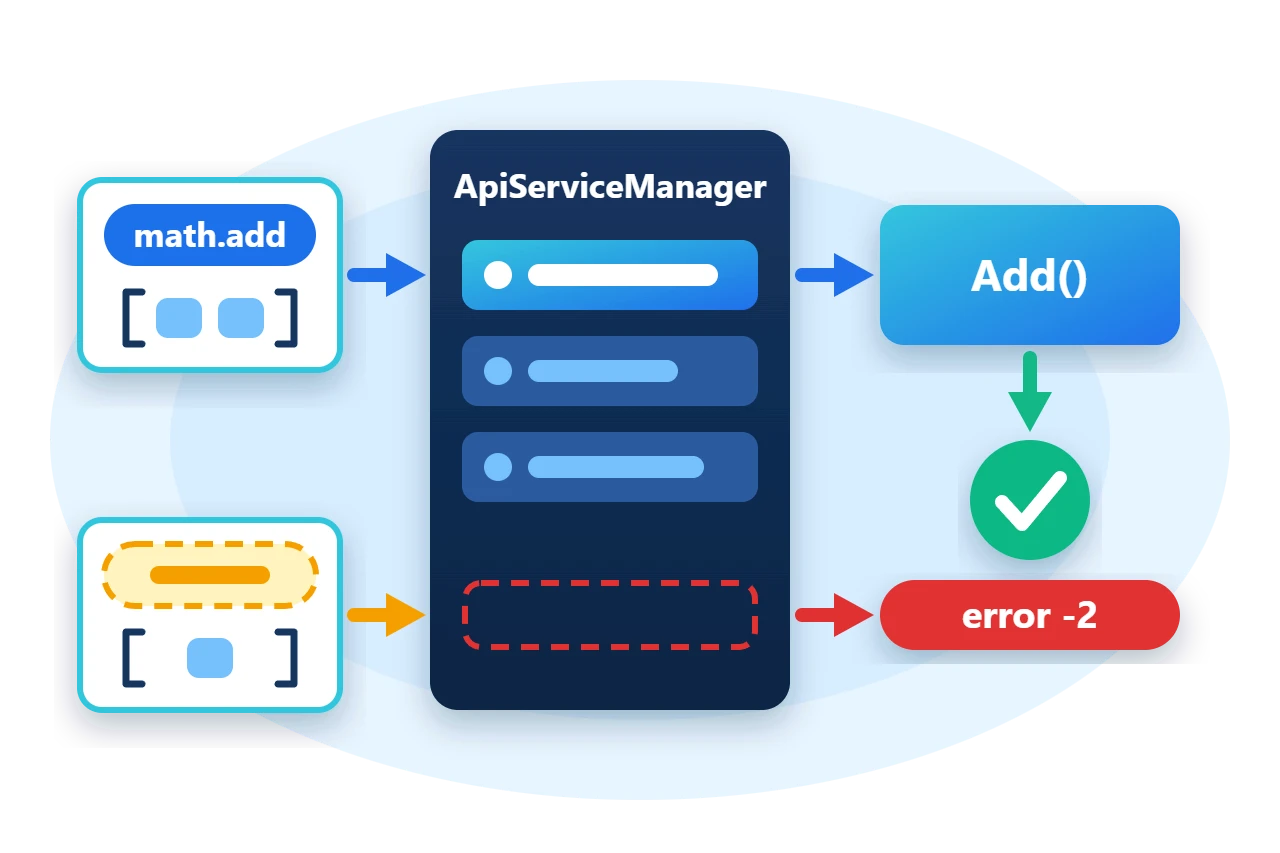
ApiServiceManager is the process-wide registry. RegisterService binds every marked method of an instance, and UnregisterService removes those bindings again. The registry does not take ownership of the instance.
var math = new MathService();
ApiServiceManager.RegisterService(math);
Each bound method is described by an ApiMethodDescriptor that holds its registered name, its ordered argument names and types, and its return type. That is enough to list or document an API at run time.
var add = ApiServiceManager.GetService("math").GetMethod("math.add");
var signature = string.Join(", ", add.Arguments.Select(argument => $"{argument.Item2.Name} {argument.Item1}"));
3. Dispatch a call
ApiServiceManager.GetServiceFromMethod finds the ApiService that owns a full method name, and ApiService.Call invokes the method with a list of JSON arguments. The sample parses a JSON-RPC request with the package's JsonRequest type and passes its params array straight through.
private static string Dispatch(string requestJson) {
	var request = JsonConvert.DeserializeObject<JsonRequest>(requestJson);
	var service = ApiServiceManager.GetServiceFromMethod(request.Method);
	var response = service == null
		? new JsonResponse { Error = new JsonRpcException(-7, $"RPC function '{request.Method}' not found") }
		: service.Call(request.Method, ((JArray)request.Params).ToList<object>());
	response.Id = request.Id;
	return response.Error == null
		? $"id {response.Id}: result {JsonConvert.SerializeObject(response.Result)}"
		: $"id {response.Id}: error {response.Error.code} ({response.Error.text})";
}
Call returns a JsonResponse that carries either a Result or an Error, never an exception. The steps between the request and the method are these.
Arguments are matched by position. Each one must be a Newtonsoft.Json JToken, and the registry converts it to the declared parameter type, so a JSON object becomes an instance of a class and a JSON array becomes an array. A byte[] parameter is read from a hexadecimal string.
Run("""{"jsonrpc":"2.0","method":"math.add","params":[5,3],"id":1}""", "id 1: result 8");
Run("""{"jsonrpc":"2.0","method":"math.mul","params":[2.5,4],"id":2}""", "id 2: result 10.0");
Run("""{"jsonrpc":"2.0","method":"MATH.Expand","params":[{"From":3,"Count":4}],"id":3}""", "id 3: result [3,4,5,6]");
4. Error codes
A call can fail at each step, and each failure has its own code in the response's Error.
-
-2means the service has no method with that name. -
-3means the number of arguments is wrong. -
-5means an argument could not be converted to its parameter type. -
-8means an argument was not aJToken. -
-9means the method threw. The error message carries the exception's own message.
GetServiceFromMethod returns null when no service owns the name. The sample reports that case as -7, the code the Framework's own request handler uses for it.
5. Limits
-
Positional arguments only. Named arguments in a JSON object are not dispatched, so
[RpcAPIArgument]names are descriptive. -
One registry per process. A second service with the same non-empty name is rejected. Unnamed services share the anonymous service and can be registered repeatedly.
-
No authentication. The registry runs whatever it is asked to run. Put access control in front of it.
-
Concurrency is yours. A method runs on the caller's thread, so a service that is called from several threads must protect its own state.
The same package contains JsonRpcServer and JsonRpcClient, which carry these requests over the Framework's TCP message endpoints. The sample stays in process and exercises the registry directly.
6. Get the package and run the sample
The registry is in the Sphere10.Framework.Communications package, in the Sphere10.Framework.Communications.RPC namespace. The package brings in Newtonsoft.Json, which the registry uses for argument conversion.
dotnet new console --framework net10.0 --name ArticleSample
cd ArticleSample
dotnet add package Sphere10.Framework.Communications
The complete MIT-licensed sample contains every file shown in this article. Extract the download over the generated project and run it.
dotnet run -c ReleaseThe program prints one line for the method description and one for each dispatched request. The first lines are these.
math.add(Int32 a, Int32 b) returns Int32
id 1: result 8
id 2: result 10.0
id 3: result [3,4,5,6]
id 4: error -2 (The method math.unknown does not exist.)
id 5: error -3 (Wrong argument count in method math.add.)
id 6: error -5 (Wrong argument type in method math.add.)
The Communications guide documents the attributes, the registry and the wire format in full.
The Sphere10 Framework overview describes the rest of the toolkit.
Author: Herman Schoenfeld
